
Homelab
ตั้งค่า node_exporter ให้ปลอดภัยด้วย mTLS และ Basic auth
วิธีเปิด Basic auth และ mTLS ให้ node_exporter ด้วย web-config.yml ไฟล์เดียวกับที่ Prometheus ใช้
Introduction
สวัสดีครับ วันนี้มาแชร์วิธีทำให้ node_exporter ปลอดภัยขึ้นกัน ด้วยการเปิด Basic auth กับ mTLS ครับ เพราะโดยปกติแล้ว Port ดังกล่าวจะสามารถดึงข้อมูลได้ทันที
ระหว่างทางผมไปเจอเรื่องที่ทำให้งงอยู่พักนึงด้วย คือไฟล์ web-config.yml ที่ปกติเราเขียนให้ Prometheus (Securing Prometheus API and UI endpoints using basic auth) เอามาใช้กับ node_exporter ได้เลย ทั้งที่ผมเข้าใจมาตลอดว่ามันเป็น config ของ Prometheus อย่างเดียว
บทความนี้ผมรันด้วย docker ทั้งหมดนะครับ เพราะลองแล้วลบทิ้งได้ง่ายดี output ทุกก้อนก๊อปมาจาก terminal ตรง ๆ (มีแก้แค่ชื่อเครื่องกับ arch ให้เป็นค่าทั่วไปนะ) เวอร์ชันที่ใช้คือ node_exporter 1.12.1 กับ Prometheus 3.13.2 (ใครรันแบบ bare metal อยู่แล้วก็อ่านข้ามส่วน docker run ไปได้ ตัว config เหมือนกันหมด เดี๋ยวมีบอกท้ายบทความว่าแก้ systemd ตรงไหน)
ของที่ต้องมีคือ docker กับ jq ส่วน htpasswd กับ promtool เดี๋ยวเรียกผ่าน docker เอา ไม่ต้องลงเพิ่ม
ปัญหาของพอร์ต 9100
ลองยกตัวที่ไม่ได้ตั้งอะไรไว้เลยขึ้นมาดูก่อนครับ
docker network create mon-net
docker run -d --name ne-open --network mon-net quay.io/prometheus/node-exporter:latest
แล้วยิงเข้าไปเฉย ๆ โดยไม่ต้องมี credential
docker run --rm --network mon-net curlimages/curl:latest \
  -s http://ne-open:9100/metrics | grep '^node_uname_info'
node_uname_info{domainname="(none)",machine="x86_64",nodename="homelab-01",sysname="Linux",version="#1 SMP PREEMPT Fri Jul 31 00:11:41 UTC 2026"} 1
ได้ชื่อเครื่อง สถาปัตยกรรม และเวอร์ชัน kernel มาครบ ลองนับทั้งหมดดู
docker run --rm --network mon-net curlimages/curl:latest \
  -s http://ne-open:9100/metrics | grep -c '^node_'
906
906 บรรทัดครับ มีทั้ง mount point ที่มีอยู่ พื้นที่ดิสก์ที่เหลือ interface ที่ต่ออยู่ แล้วก็เวอร์ชัน kernel ที่บอกกลาย ๆ ว่าเครื่องนี้แพตช์ล่าสุดเมื่อไหร่ ข้อมูลพวกนี้อย่างเดียวไม่ได้ทำให้ใครเข้าเครื่องได้ แต่มันก็นับว่าเป็นข้อมูลที่สำคัญในการนำไปหาข้อมูลต่อได้
ลบตัวทดลองทิ้งก่อนไปต่อ
docker rm -f ne-open
config ที่ใช้ร่วมกัน
ทีนี้มาถึงเรื่องที่ผมเข้าใจผิดมาตลอดครับ
พอเปิด --help ของ node_exporter ดู มันชี้ไปที่ repo ของ exporter-toolkit ตรง ๆ เลย
--web.config.file=""       Path to configuration file that can
                           enable TLS or authentication. See:
                           https://github.com/prometheus/exporter-toolkit/blob/master/docs/web-configuration.md
ในเอกสารตัวนั้นก็เขียนไว้ตรง ๆ ว่า "Exporters and services instrumented with the Exporter Toolkit share the same web configuration file format."
แปลว่า Prometheus, node_exporter, Alertmanager และ exporter ตัวอื่น ๆ ในตระกูลนี้ใช้ library ตัวเดียวกันจัดการเรื่อง TLS กับ auth ไฟล์ config เลยหน้าตาเหมือนกันหมด flag ที่ใช้เปิดก็ชื่อเดียวกันคือ --web.config.file
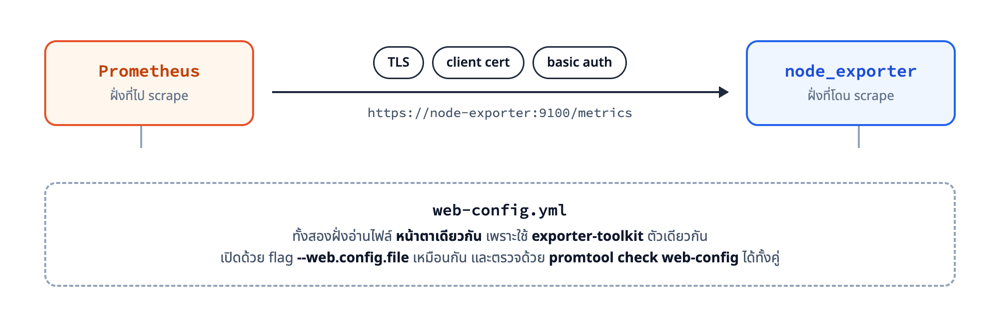
ตอนรัน node_exporter จะเห็นใน log ด้วยว่ามันเรียก tls_config.go ซึ่งเป็นไฟล์ของ exporter-toolkit ไม่ใช่โค้ดของ node_exporter เอง
level=INFO source=tls_config.go:415 msg="TLS is enabled." http2=true address=[::]:9100
สร้าง cert
mTLS แปลว่าทั้งสองฝั่งต้องยืนยันตัวตนกัน ไม่ใช่แค่ฝั่ง server เพราะฉะนั้นต้องมี CA ของตัวเองไว้เซ็นให้ทั้งคู่
mkdir -p ~/node-exporter/certs && cd ~/node-exporter/certs

# CA ของเราเอง
openssl req -x509 -newkey rsa:2048 -nodes -days 365 \
  -keyout ca.key -out ca.crt -subj "/CN=homelab-ca"

# cert ฝั่ง node_exporter
openssl req -newkey rsa:2048 -nodes -keyout server.key -out server.csr \
  -subj "/CN=node-exporter"
printf "subjectAltName=DNS:node-exporter,DNS:localhost,IP:127.0.0.1" > san.ext
openssl x509 -req -in server.csr -CA ca.crt -CAkey ca.key -CAcreateserial \
  -out server.crt -days 365 -extfile san.ext

# cert ฝั่ง Prometheus
openssl req -newkey rsa:2048 -nodes -keyout client.key -out client.csr \
  -subj "/CN=prometheus"
openssl x509 -req -in client.csr -CA ca.crt -CAkey ca.key -CAcreateserial \
  -out client.crt -days 365
ตรง subjectAltName สำคัญมากครับ ต้องใส่ชื่อหรือ IP ที่ Prometheus จะใช้เรียกจริง ๆ ถ้าใส่ไม่ตรงจะ verify ไม่ผ่านตอน scrape เช็คได้ด้วย
openssl verify -CAfile ca.crt server.crt client.crt
server.crt: OK
client.crt: OK
เปิด basic auth
รหัสผ่านใน web-config.yml ต้องเป็น bcrypt hash ใส่เป็นข้อความเปล่าไม่ได้ (ถ้าใส่ไป node_exporter จะขึ้นมาแป๊บนึงแล้วดับ พร้อม log ว่า hashedSecret too short to be a bcrypted password) สร้าง hash ด้วย htpasswd
docker run --rm -it httpd:2.4-alpine htpasswd -nBC 12 prometheus
มันจะถามรหัสให้พิมพ์สองรอบ แล้วพ่นออกมาแบบนี้
prometheus:$2y$12$<hash 53 ตัวอักษร>
ที่ไม่ใช้ -b แล้วพิมพ์รหัสต่อท้ายคำสั่งไปเลย เพราะรหัสจะไปค้างใน shell history แล้วก็โผล่ใน ps ด้วยครับ
เปิด mTLS
เอา hash ที่ได้มาใส่ แล้วเติม tls_server_config เข้าไปในไฟล์เดียวกัน สร้างที่ ~/node-exporter/web-config.yml
cat > ~/node-exporter/web-config.yml <<'EOF'
tls_server_config:
  cert_file: /etc/node_exporter/certs/server.crt
  key_file: /etc/node_exporter/certs/server.key
  client_auth_type: RequireAndVerifyClientCert
  client_ca_file: /etc/node_exporter/certs/ca.crt
  min_version: TLS12

basic_auth_users:
  prometheus: $2y$12$<hash ที่ได้จากขั้นตอนที่แล้ว>
EOF
path ใน config เป็น path ข้างใน container นะครับ เดี๋ยวตอน docker run เรา mount ~/node-exporter/certs ไปไว้ที่ /etc/node_exporter/certs ให้ตรงกัน ถ้ารันแบบ bare metal ก็เปลี่ยนเป็น path จริงบนเครื่องได้เลย
หัวใจอยู่ที่ client_auth_type: RequireAndVerifyClientCert ครับ อันนี้แหละที่ทำให้เป็น mTLS จริง ๆ คือ server จะบังคับให้ client ส่ง cert มาด้วย แล้วตรวจว่าเซ็นด้วย CA ใน client_ca_file หรือเปล่า
เอกสารของ exporter-toolkit เตือนไว้ตรง ๆ ว่า "If you want to enable client authentication, you need to use RequireAndVerifyClientCert. Other values are insecure." อย่าใส่ค่าอื่นแม้ชื่อจะดูคล้ายกันนะครับ
รันได้แล้ว
docker run -d --name node-exporter --network mon-net \
  -v ~/node-exporter/web-config.yml:/etc/node_exporter/web-config.yml:ro \
  -v ~/node-exporter/certs:/etc/node_exporter/certs:ro \
  quay.io/prometheus/node-exporter:latest \
  --web.config.file=/etc/node_exporter/web-config.yml
ทดสอบทีละชั้น
ตรงนี้สนุกครับ เพราะขาดชั้นไหนไป error ที่ได้ก็คนละแบบกัน ใช้ไล่หาสาเหตุได้เลย
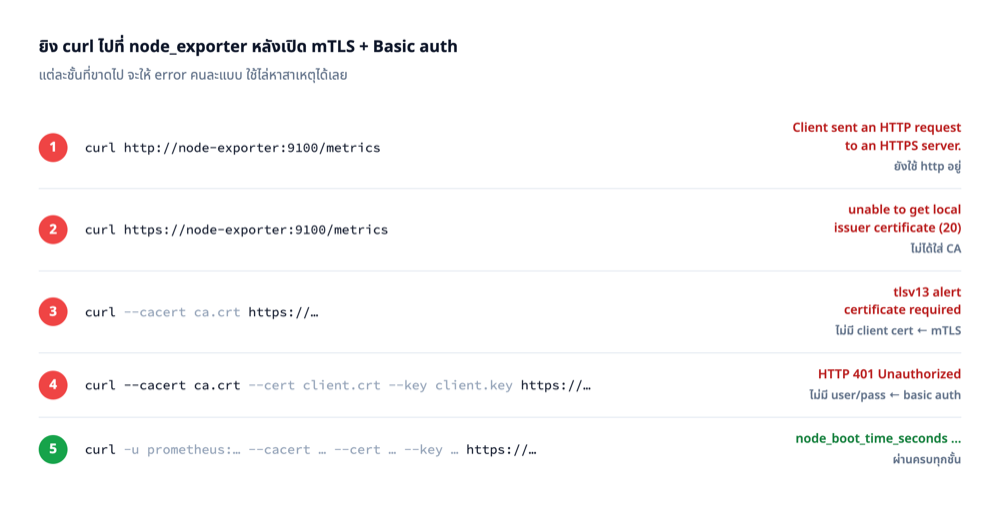
ผมตั้ง alias สั้น ๆ ไว้ก่อน จะได้ไม่ต้องพิมพ์ยาว
alias c='docker run --rm --network mon-net -v ~/node-exporter/certs:/c:ro curlimages/curl:latest'
เริ่มจากยิง http เปล่า ๆ แบบเดิม
c -sS http://node-exporter:9100/metrics
Client sent an HTTP request to an HTTPS server.
เปลี่ยนเป็น https แต่ยังไม่บอก CA
c -sS https://node-exporter:9100/metrics
curl: (60) SSL certificate OpenSSL verify result: unable to get local issuer certificate (20)
More details here: https://curl.se/docs/sslcerts.html
ใส่ CA แล้วแต่ยังไม่มี client cert
c -sS --cacert /c/ca.crt https://node-exporter:9100/metrics
curl: (56) OpenSSL SSL_read: OpenSSL/3.5.7: error:0A00045C:SSL routines::tlsv13 alert certificate required, errno 0
บรรทัด alert certificate required นี่แหละครับคือหลักฐานว่า mTLS ทำงานอยู่ ฝั่ง server ไม่ยอมคุยต่อเพราะเราไม่ได้ส่ง cert ไปให้
ข้อความพวกนี้มาจาก curl ที่ build กับ OpenSSL นะครับ ถ้ายิงจาก macOS ที่ curl ใช้ LibreSSL จะได้เลข exit code กับข้อความคนละแบบ และจะไม่มีคำว่า
alert certificate requiredให้เห็น ผมเลยยิงผ่าน container เอาเพื่อให้ทุกคนได้ผลเหมือนกัน
ใส่ client cert แล้วแต่ยังไม่ใส่ user กับ password
c -sS --cacert /c/ca.crt --cert /c/client.crt --key /c/client.key \
  https://node-exporter:9100/metrics
Unauthorized
คราวนี้ผ่านชั้น TLS มาได้แล้ว มาตกที่ basic auth แทน (HTTP 401) ใส่ให้ครบทั้งหมด
c -sS -u prometheus:'รหัสที่ตั้งไว้' \
  --cacert /c/ca.crt --cert /c/client.crt --key /c/client.key \
  https://node-exporter:9100/metrics | grep -E '^node_(boot_time_seconds|uname_info)'
node_boot_time_seconds 1.786004256e+09
node_uname_info{domainname="(none)",machine="x86_64",nodename="homelab-01",...} 1
ฝั่ง Prometheus
ทีนี้ต้องบอก Prometheus ว่าให้ส่งอะไรไปบ้างตอน scrape
cat > ~/node-exporter/prometheus.yml <<'EOF'
global:
  scrape_interval: 15s

scrape_configs:
  - job_name: 'node'
    scheme: https
    static_configs:
      - targets: ['node-exporter:9100']
    basic_auth:
      username: prometheus
      password: 'รหัสที่ตั้งไว้'
    tls_config:
      ca_file: /etc/prometheus/certs/ca.crt
      cert_file: /etc/prometheus/certs/client.crt
      key_file: /etc/prometheus/certs/client.key
EOF

docker run -d --name prometheus --network mon-net -p 9090:9090 \
  -v ~/node-exporter/prometheus.yml:/etc/prometheus/prometheus.yml:ro \
  -v ~/node-exporter/certs:/etc/prometheus/certs:ro \
  prom/prometheus:latest
จุดที่คนพลาดกันบ่อยคือลืม scheme: https ครับ ค่าเริ่มต้นของ Prometheus คือ http ผมลองลบบรรทัดนั้นออกดูแล้ว หน้า target จะขึ้นแบบนี้
url       = http://node-exporter:9100/metrics
health    = down
lastError = server returned HTTP status 400 Bad Request
สังเกตว่ามันไม่ได้บอกว่า Client sent an HTTP request to an HTTPS server เหมือนตอนที่เรายิง curl เองนะครับ ข้อความนั้นเป็นแค่ body ที่ Prometheus ทิ้งไป เหลือให้เห็นแค่ 400 เฉย ๆ เพราะฉะนั้นถ้าเจอ 400 กับ target ที่เป็น node_exporter ให้สงสัยเรื่อง scheme ไว้ก่อนเลย
ส่วนที่ไม่ได้ใส่ไว้ในตัวอย่างคือ server_name ครับ มันเป็นตัว override ชื่อที่ใช้ตรวจ cert จำเป็นตอนที่ address ของ target ไม่ตรงกับ SAN เช่นเวลา scrape ด้วย IP ในที่นี้ node-exporter:9100 ตรงกับ DNS:node-exporter อยู่แล้วเลยไม่ต้องใส่
รอสัก 20 วินาทีให้ scrape รอบแรกทำงานก่อนนะครับ แล้วค่อยเช็ค ถ้าถามเร็วเกินไปจะเห็น health เป็น unknown แล้วนึกว่าพัง
curl -s http://localhost:9090/api/v1/targets \
  | jq -r '.data.activeTargets[] | "\(.labels.job)  \(.health)  \(.scrapeUrl)"'
node up https://node-exporter:9100/metrics
หรือจะ query ค่า up ตรง ๆ ก็ได้
curl -sG http://localhost:9090/api/v1/query --data-urlencode 'query=up{job="node"}' \
  | jq -r '.data.result[] | "up = \(.value[1])  instance=\(.metric.instance)"'
up = 1 instance=node-exporter:9100
ได้ 1 แปลว่า scrape ผ่าน mTLS สำเร็จแล้วครับ
ตรวจ config
อันนี้เป็นของแถมที่ผมชอบมาก promtool ของ Prometheus ตรวจไฟล์ของ node_exporter ได้ด้วย เพราะมันเป็น format เดียวกันนั่นแหละ
docker run --rm --entrypoint promtool \
  -v ~/node-exporter/web-config.yml:/w.yml:ro \
  -v ~/node-exporter/certs:/etc/node_exporter/certs:ro \
  prom/prometheus:latest check web-config /w.yml
/w.yml SUCCESS
ลองพิมพ์ค่าผิดดูว่ามันจับได้ไหม
/w.yml FAILED: invalid ClientAuth: RequireAnyClientCert2
จับได้ครับ ควรรันทุกครั้งก่อน restart service เพราะถ้า config พังแล้ว service ไม่ขึ้น กว่าจะรู้ตัวก็ตอน metrics หายไปแล้ว
อย่างเดียวที่ต้องระวังคือมันเปิดไฟล์ cert ตาม path ใน config ไปด้วย เพราะฉะนั้นต้องรันบนเครื่องที่มีไฟล์พวกนั้นอยู่จริง (หรือ mount เข้าไปให้ตรง path เหมือนคำสั่งข้างบน) ไม่งั้นจะได้ failed to read cert_file ทั้งที่ config ถูกทุกอย่าง
ถ้ารันแบบ bare metal
ที่ทำมาทั้งหมดใช้กับ systemd ได้เหมือนกันครับ ต่างแค่สองอย่าง
หนึ่ง เปลี่ยน path ใน web-config.yml เป็น path จริงบนเครื่อง แล้วก๊อป cert ไปไว้ตรงนั้น
sudo mkdir -p /etc/node_exporter
sudo cp -r ~/node-exporter/certs ~/node-exporter/web-config.yml /etc/node_exporter/
สอง เติม flag เข้าไปใน unit ที่ /etc/systemd/system/node_exporter.service
ExecStart=/usr/local/bin/node_exporter \
  --web.config.file=/etc/node_exporter/web-config.yml
แล้ว sudo systemctl daemon-reload && sudo systemctl restart node_exporter ตามปกติ ส่วน promtool จะติดมากับ tarball ของ Prometheus อยู่แล้ว และ htpasswd อยู่ในแพ็กเกจ apache2-utils (Debian/Ubuntu) หรือ httpd-tools (RHEL)
ข้อควรระวัง
รหัสผ่านอยู่หลายที่ ต้องเปลี่ยนพร้อมกัน ตอนหมุนรหัสต้องแก้ทั้ง web-config.yml ฝั่ง node_exporter และ basic_auth ใน prometheus.yml ถ้าแก้ไม่ครบ target จะกลายเป็น down แล้วอาการที่เห็นมีอย่างเดียวคือ up เป็น 0
cert มีวันหมดอายุ ที่ผมตั้งไว้คือ 365 วัน พอครบแล้ว target ตัวนั้นจะ down ทันที (ตัวอื่นที่ไม่ได้ใช้ cert ยังทำงานปกติ) ที่สำคัญคือ ต้องจำวันหมดอายุเอง เพราะสแตกที่ตั้งในบทความนี้ไม่มีตัวไหนคอย monitor cert ให้ ผมลอง query probe_ssl_earliest_cert_expiry ที่หลายคนแนะนำกันดูแล้ว ได้ผลลัพธ์ว่างเปล่า เพราะ metric ตัวนั้นเป็นของ blackbox_exporter ซึ่งไม่ได้อยู่ในบทความนี้ ถ้าจะใช้จริงต้องลง blackbox_exporter เพิ่มแล้วตั้ง module ให้ใส่ client cert ไปด้วย ไม่งั้นมันก็ทะลุ mTLS เข้าไปวัดไม่ได้เหมือนกัน ทางที่ง่ายกว่าคือจดวันหมดอายุใส่ปฏิทินไว้เลยครับ
ถ้า Prometheus อยู่เครื่องเดียวกับ node_exporter ผูก --web.listen-address=127.0.0.1:9100 ไปเลยง่ายกว่าเยอะครับ ไม่ต้องยุ่งกับ cert เลยสักนิด mTLS มีประโยชน์ตอนที่ต้องวิ่งข้ามเครื่องข้ามวงจริง ๆ
ลบของทิ้ง
ลองเสร็จแล้วเก็บกวาดด้วยนะครับ
docker rm -f node-exporter prometheus
docker network rm mon-net
docker rmi quay.io/prometheus/node-exporter:latest prom/prometheus:latest curlimages/curl:latest
rm -rf ~/node-exporter
unalias c
สรุป
เรื่องที่ผมได้จากรอบนี้ไม่ใช่แค่วิธีเปิด mTLS ครับ แต่เป็นการรู้ว่า web-config.yml มันเป็นไฟล์ที่ใช้ร่วมกันได้กับทุกตัวในตระกูล Prometheus ซึ่งแปลว่าถ้าเคยตั้งให้ตัวไหนไปแล้วตัวนึง ที่เหลือก็ก๊อปแล้วแก้ path เอาได้เลย ไม่ต้องไปเรียนรู้ใหม่
ส่วนใครที่ยังปล่อย node_exporter โล่งอยู่ ถ้าอยู่ในวงบ้านที่มีแต่เราคนเดียวก็อาจจะยังไม่ต้องรีบ แต่ถ้ามีเครื่องอื่นหรือคนอื่นอยู่ในวงด้วยก็ควรทำอะไรสักอย่างแล้วครับ
มีเรื่องนึงที่ต้องบอกไว้ด้วย ถ้าใส่แค่ basic auth โดยไม่เปิด TLS รหัสผ่านจะวิ่งไปแบบ base64 ซึ่งถอดกลับได้ทันที ใครดักอ่านในวงเดียวกันก็เห็นตั้งแต่ scrape รอบแรก มันพอกันคนที่บังเอิญเปิดเจอได้ก็จริง แต่ไม่ได้กันคนที่ตั้งใจดัก เพราะฉะนั้นถ้าจะใส่แค่ basic auth ก่อน อย่าเอารหัสที่ใช้ที่อื่นมาใช้ซ้ำนะครับ ตัวที่ปกป้องรหัสจริง ๆ คือ TLS
References
Related Articles