
Lesson 8
Defend the HTTP Server
ตั้ง transport_security ของ http_server.py ให้รับแค่ Host 127.0.0.1:8765 ที่ไม่มี Origin เรียก API ปลายทางด้วย credential ของ server เอง เขียน pytest แล้วทำให้ Fail เพื่อพิสูจน์ว่าจับได้ ปิดท้ายด้วย checklist ก่อนติดตั้งและก่อนเปิด server
บทนี้ปิดช่องของบท HTTP Attacks แล้วส่ง request ชุดเดิมซ้ำครับ
ทุกคำสั่งรันในโฟลเดอร์ cafe-mcp และต้องมี tokens.env จากบท Require a Token
What to Defend
| Attack | Change | What Stops It |
|---|---|---|
| DNS rebinding | TRANSPORT_SECURITY ใน auth.py ส่งให้ http_server.py | server ตอบ 421 หรือ 403 และ pytest |
| Token passthrough | pos.py | pytest ที่ตรวจ header ที่ส่งออก |
Write the Code
TRANSPORT_SECURITYในauth.pyและhttp_server.pypos.py- script
try_*.pyสองตัวสำหรับรันโดยไม่ต้องมี AI - pytest สองไฟล์
1. Transport Security
เพิ่ม TRANSPORT_SECURITY ใน auth.py ต่อจาก AUTH_SETTINGS พร้อม import
from mcp.server.transport_security import TransportSecuritySettings

# Only Host 127.0.0.1:8765 passes, and a request that carries any Origin header is refused.
TRANSPORT_SECURITY = TransportSecuritySettings(
    enable_dns_rebinding_protection=True,
    allowed_hosts=["127.0.0.1:8765"],
    allowed_origins=[],
)
แล้วส่งให้ entry point
from auth import TRANSPORT_SECURITY
from cafe_server import mcp

mcp.run(transport="streamable-http", host="127.0.0.1", port=8765, transport_security=TRANSPORT_SECURITY)
- ค่าเริ่มต้นของ SDK รับ
127.0.0.1,localhostและ[::1]ทุก port ค่าใหม่รับ Host เดียวคือ127.0.0.1:8765ตรงกับRESOURCE_URL - request ที่ไม่มี header
Originผ่าน ส่วนที่มี Origin แต่ไม่อยู่ในรายการได้403พอallowed_origins=[]ทุก request ที่มี Origin ก็ได้403curl กับ client ของ SDK ไม่ส่ง Origin แต่เบราว์เซอร์ส่งทุกครั้งที่ข้าม origin - เก็บค่าไว้ใน
auth.pyเพราะtry_bind_fixed.pyต้อง import และhttp_server.pyเรียกmcp.runทันทีที่ถูก import
2. pos.py
โค้ดฝั่งที่ถูกของ Token Passthrough เขียนเป็นไฟล์แยกให้ทดสอบได้ ไม่ได้ลงทะเบียนเป็น tool ของ cafe
import os
from datetime import date

import httpx2

from auth import require_scope


async def fetch_sales(day: str, http: httpx2.AsyncClient) -> str:
    """Calls the POS API with this server's own credential, never with the caller's token."""
    require_scope("orders:read")
    day = date.fromisoformat(day).isoformat()
    response = await http.get(
        f"https://pos.example.com/sales/{day}",
        headers={"Authorization": f"Bearer {os.environ['POS_API_TOKEN']}"},
    )
    response.raise_for_status()
    return response.text
require_scopeตรวจสิทธิ์ของผู้เรียกจาก token ที่ SDK ตรวจแล้ว ส่วนAuthorizationที่ส่งออกไปใช้POS_API_TOKENที่ API ปลายทางออกให้ serverdate.fromisoformatบังคับให้dayเป็นวันที่ก่อนเข้า URL ค่าอย่าง../adminไม่ถึง API- import
httpx2เพราะ SDK 2.3.0 ใช้ตัวนี้ ใน virtual environment ไม่มีhttpx - แทน
pos.example.comกับPOS_API_TOKENด้วย API ที่ server ของเราเรียกจริง pytest ใช้httpx2.MockTransportเลยไม่มี request ออกนอกเครื่อง
3. Scripts
try_defended_client.py เป็น client ของ SDK ที่แนบ token ของ staff ไว้เช็กว่า client ปกติยังต่อได้
# DEMO: an MCP client over HTTP, with the token header, against the hardened http_server.py.
import asyncio
import os

import httpx2
from mcp import Client
from mcp.client.streamable_http import streamable_http_client


async def main() -> None:
    headers = {"Authorization": f"Bearer {os.environ['CAFE_STAFF_TOKEN']}"}
    async with httpx2.AsyncClient(headers=headers) as http:
        async with Client(streamable_http_client("http://127.0.0.1:8765/mcp", http_client=http)) as client:
            print("tools:", [tool.name for tool in (await client.list_tools()).tools])
            menu = await client.call_tool("list_menu", {"max_price_thb": 50})
            print("list_menu is_error:", menu.is_error)


asyncio.run(main())
try_bind_fixed.py ทำแบบ try_bind.py ที่ 0.0.0.0 เทียบกันระหว่างไม่ส่งกับส่ง TRANSPORT_SECURITY
# DEMO: a server bound to 0.0.0.0 with and without explicit transport_security. No network needed.
from mcp.server.mcpserver import MCPServer
from starlette.testclient import TestClient

from auth import TRANSPORT_SECURITY

BODY = {
    "jsonrpc": "2.0",
    "id": 1,
    "method": "tools/list",
    "params": {"_meta": {"io.modelcontextprotocol/protocolVersion": "2026-07-28", "io.modelcontextprotocol/clientCapabilities": {}}},
}
HEADERS = {
    "Content-Type": "application/json",
    "Accept": "application/json, text/event-stream",
    "MCP-Protocol-Version": "2026-07-28",
    "Mcp-Method": "tools/list",
}
FOREIGN = "http://evil.example.com:8765"
CASES = [
    ("0.0.0.0, no settings, foreign Host and Origin", None, FOREIGN, {"Origin": FOREIGN}),
    ("0.0.0.0, explicit settings, foreign Host and Origin", TRANSPORT_SECURITY, FOREIGN, {"Origin": FOREIGN}),
    ("0.0.0.0, explicit settings, Host 127.0.0.1:8765", TRANSPORT_SECURITY, "http://127.0.0.1:8765", {}),
]

for label, settings, base_url, extra_headers in CASES:
    app = MCPServer("probe").streamable_http_app(host="0.0.0.0", transport_security=settings)
    with TestClient(app, base_url=base_url) as http:
        print(f"{label} ->", http.post("/mcp", headers=HEADERS | extra_headers, json=BODY).status_code)
4. Tests
import runpy

import pytest
import uvicorn
from starlette.testclient import TestClient

BODY = {
    "jsonrpc": "2.0",
    "id": 1,
    "method": "tools/list",
    "params": {"_meta": {"io.modelcontextprotocol/protocolVersion": "2026-07-28", "io.modelcontextprotocol/clientCapabilities": {}}},
}


def served_config(monkeypatch) -> uvicorn.Config:
    """Runs http_server.py with uvicorn stubbed out and returns the config it would have served."""
    served = []

    async def capture(server, *args, **kwargs):
        served.append(server.config)

    monkeypatch.setattr(uvicorn.Server, "serve", capture)
    runpy.run_module("http_server")
    return served[0]


@pytest.mark.parametrize(
    "extra_headers, expected_status",
    [
        ({}, 200),
        ({"Host": "evil.example.com:8765"}, 421),
        ({"Origin": "https://evil.example.com"}, 403),
        ({"Host": "evil.example.com:8765", "Origin": "http://evil.example.com:8765"}, 421),
        ({"Origin": "http://localhost:3000"}, 403),
        ({"Host": "localhost:8765"}, 421),
    ],
    ids=["normal", "foreign-host", "foreign-origin", "foreign-host-and-origin", "localhost-origin", "localhost-host"],
)
def test_http_server_refuses_foreign_host_and_origin(monkeypatch, extra_headers, expected_status):
    monkeypatch.setenv("CAFE_VIEWER_TOKEN", "secret-for-viewer")
    headers = {
        "Authorization": "Bearer secret-for-viewer",
        "Content-Type": "application/json",
        "Accept": "application/json, text/event-stream",
        "MCP-Protocol-Version": "2026-07-28",
        "Mcp-Method": "tools/list",
        **extra_headers,
    }
    config = served_config(monkeypatch)
    assert (config.host, config.port) == ("127.0.0.1", 8765)
    with TestClient(config.app, base_url="http://127.0.0.1:8765") as http:
        assert http.post("/mcp", headers=headers, json=BODY).status_code == expected_status
import httpx2
import pytest
from mcp.server.auth.middleware.auth_context import auth_context_var
from mcp.server.auth.middleware.bearer_auth import AuthenticatedUser
from mcp.server.auth.provider import AccessToken
from mcp.server.mcpserver.exceptions import ToolError

from pos import fetch_sales


def mock_pos_api(requests: list[httpx2.Request]) -> httpx2.AsyncClient:
    def respond(request: httpx2.Request) -> httpx2.Response:
        requests.append(request)
        return httpx2.Response(200, text='{"total_thb": 225}')

    return httpx2.AsyncClient(transport=httpx2.MockTransport(respond))


@pytest.fixture(autouse=True)
def pos_credential(monkeypatch):
    monkeypatch.setenv("POS_API_TOKEN", "token-issued-to-this-server")
    yield
    auth_context_var.set(None)


async def test_downstream_call_carries_the_servers_credential_not_the_callers():
    auth_context_var.set(AuthenticatedUser(AccessToken(token="token-of-the-caller", client_id="viewer", scopes=["orders:read"])))
    requests: list[httpx2.Request] = []
    async with mock_pos_api(requests) as http:
        await fetch_sales("2026-11-24", http)
    assert requests[0].headers["Authorization"] == "Bearer token-issued-to-this-server"
    assert "token-of-the-caller" not in str(requests[0].headers)


async def test_caller_without_scope_never_reaches_the_downstream_api():
    auth_context_var.set(AuthenticatedUser(AccessToken(token="token-of-the-caller", client_id="guest", scopes=[])))
    requests: list[httpx2.Request] = []
    async with mock_pos_api(requests) as http:
        with pytest.raises(ToolError):
            await fetch_sales("2026-11-24", http)
    assert requests == []


async def test_day_must_be_a_date_before_it_reaches_the_url():
    requests: list[httpx2.Request] = []
    async with mock_pos_api(requests) as http:
        with pytest.raises(ValueError):
            await fetch_sales("../admin", http)
    assert requests == []
test_transport_security.pyรันhttp_server.pyด้วยrunpyโดยแทนuvicorn.Server.serveด้วยฟังก์ชันที่เก็บ config ไว้เฉย ๆ app ที่ได้เลยสร้างตามทางเดียวกับตอนรันจริง แค่ไม่เปิด port ถ้าhttp_server.pyลืมส่งTRANSPORT_SECURITYเทสต์นี้ Fail- กรณี Host กับ Origin แปลกพร้อมกันคาดว่าได้
421ตามที่ SDK 2.3.0 ตอบ test_pos.pyตรวจว่า header ที่ไปถึง API ปลายทางเป็น credential ของ server ผู้เรียกที่ไม่มี scope ไม่ทำให้เกิด request เลย และdayที่ไม่ใช่วันที่ถูกปฏิเสธก่อนสร้าง URL
Re-run the Attacks
- Host และ Origin ด้วย
probeชุดเดิม - bind ที่
0.0.0.0แบบส่ง settings
Host and Origin
รัน http_server.py ที่แก้แล้ว
source tokens.env
uv run python http_server.py
ใน terminal ที่มี probe อยู่ (ถ้าปิดไปแล้ว ตั้งใหม่ตามบท HTTP Attacks) ส่งชุดเดิมซ้ำ แล้วเพิ่ม Host localhost:8765
probe "$CAFE_STAFF_TOKEN" -H 'Origin: http://localhost:3000'
HTTP/1.1 403 Forbidden
Invalid Origin header
probe "$CAFE_STAFF_TOKEN" -H 'Host: localhost:8765'
HTTP/1.1 421 Misdirected Request
Invalid Host header
| Request | Before | Now |
|---|---|---|
token ของ staff, Host 127.0.0.1:8765, ไม่มี Origin | 200 | 200 |
Host: evil.example.com:8765 | 421 | 421 |
Origin: https://evil.example.com | 403 | 403 |
| Host และ Origin แปลกพร้อมกัน | 421 | 421 |
Origin: http://localhost:3000 | 200 | 403 |
Host: localhost:8765 | ไม่ได้ส่ง | 421 |
| token ว่าง | 401 | 401 |
แถวที่เปลี่ยนคือ Origin ของ localhost port อื่น ที่เหลือ SDK ตอบแบบนี้อยู่แล้ว แต่ตอนนี้ไม่ได้พึ่งค่าเริ่มต้นของ SDK แล้ว
client ที่แนบ token ยังต่อได้
uv run python try_defended_client.py
tools: ['list_menu', 'create_order', 'cancel_order']
list_menu is_error: False
Bind to 0.0.0.0
uv run python try_bind_fixed.py 2>/dev/null
0.0.0.0, no settings, foreign Host and Origin -> 200
0.0.0.0, explicit settings, foreign Host and Origin -> 421
0.0.0.0, explicit settings, Host 127.0.0.1:8765 -> 200
ส่ง settings เองแล้ว bind ที่ทุก interface ก็ยังปฏิเสธ Host แปลกได้ แต่ http_server.py ยัง bind ที่ 127.0.0.1 ตามที่ spec แนะนำ ถ้าต้องเปิดให้เครื่องอื่นในเครือข่ายเรียก ต้องทำพร้อมกันสามอย่าง
- ระบุ
allowed_hostsเป็นชื่อที่ client ใช้เรียกจริง เช่นcafe.example.comและใส่allowed_originsเฉพาะเมื่อมีเว็บแอปที่เรียก server ตรง ๆ - วาง reverse proxy ที่ทำ HTTPS ไว้ข้างหน้า เพราะ bearer token บน HTTP ธรรมดาถูกดักอ่านได้
- คง token กับ scope ไว้ เพราะ Host กับ Origin กันได้แค่ request จากเบราว์เซอร์
Run the Tests
- ชุดทดสอบทั้งหมด
- ลบ
transport_securityออกจากhttp_server.pyแล้วดูเทสต์ Fail - ให้
pos.pyส่ง token ของผู้เรียกแล้วดูเทสต์ Fail
uv run pytest -q
.................................                                        [100%]
33 passed in 0.20s
22 ตัวจากบท Limit Tools by Scope บวก 2 ตัวของ test_review_tools.py จากบท Defend Against Tool Attacks และ 9 ตัวของบทนี้
เทสต์ที่ไม่เคย Fail ยังพิสูจน์อะไรไม่ได้ ลบ , transport_security=TRANSPORT_SECURITY ออกจากบรรทัด mcp.run ใน http_server.py แล้วรัน
uv run pytest tests/test_transport_security.py -v | grep -E 'PASSED|FAILED|passed|failed'
tests/test_transport_security.py::test_http_server_refuses_foreign_host_and_origin[normal] PASSED [ 16%]
tests/test_transport_security.py::test_http_server_refuses_foreign_host_and_origin[foreign-host] PASSED [ 33%]
tests/test_transport_security.py::test_http_server_refuses_foreign_host_and_origin[foreign-origin] PASSED [ 50%]
tests/test_transport_security.py::test_http_server_refuses_foreign_host_and_origin[foreign-host-and-origin] PASSED [ 66%]
tests/test_transport_security.py::test_http_server_refuses_foreign_host_and_origin[localhost-origin] FAILED [ 83%]
tests/test_transport_security.py::test_http_server_refuses_foreign_host_and_origin[localhost-host] FAILED [100%]
FAILED tests/test_transport_security.py::test_http_server_refuses_foreign_host_and_origin[localhost-origin]
FAILED tests/test_transport_security.py::test_http_server_refuses_foreign_host_and_origin[localhost-host]
========================= 2 failed, 4 passed in 0.07s ==========================
สองตัวที่ Fail คือกรณี localhost ที่ค่าของเราแคบกว่าค่าเริ่มต้นของ SDK ใส่ transport_security=TRANSPORT_SECURITY คืนแล้วรันใหม่จะได้ 6 passed
ต่อไปทำให้ pos.py พัง เพิ่ม from mcp.server.auth.middleware.auth_context import get_access_token แล้วเปลี่ยนค่าใน Authorization จาก os.environ['POS_API_TOKEN'] เป็น get_access_token().token
uv run pytest tests/test_pos.py -q | grep -E 'FAILED|passed|failed|AssertionError'
E       AssertionError: assert 'Bearer token-of-the-caller' == 'Bearer token...o-this-server'
tests/test_pos.py:31: AssertionError
FAILED tests/test_pos.py::test_downstream_call_carries_the_servers_credential_not_the_callers
1 failed, 2 passed in 0.04s
token ของผู้เรียกหลุดไปถึง API ปลายทาง เทสต์เลย Fail คืนโค้ดเดิมแล้วรัน uv run pytest -q ให้ได้ 33 passed
Try It in Claude Code
- ต่อ
cafe-authกับhttp_server.pyที่ตั้งค่าใหม่ - ล้างสิ่งที่ลงทะเบียนไว้
Connect cafe-auth
allowed_origins=[] ปฏิเสธทุก request ที่มี Origin ถ้า Claude Code ส่ง Origin มา cafe-auth จะต่อไม่ได้ ลองดู
ถ้า http_server.py จากหัวข้อ Host and Origin ยังรันอยู่ ใช้ตัวนั้นต่อได้เลย (ถ้าปิดไปแล้ว เปิดใหม่จาก shell ที่ source tokens.env แล้ว) จากนั้นลงทะเบียน cafe-auth ใหม่ในอีก terminal (บท Limit Tools by Scope ถอดออกไปแล้ว)
claude mcp add-json cafe-auth '{"type":"http","url":"http://127.0.0.1:8765/mcp","headers":{"Authorization":"Bearer ${CAFE_STAFF_TOKEN}"}}' --scope project
เปิด claude จาก shell ที่ source tokens.env แล้ว พิมพ์ /mcp แล้วเลือก cafe-auth
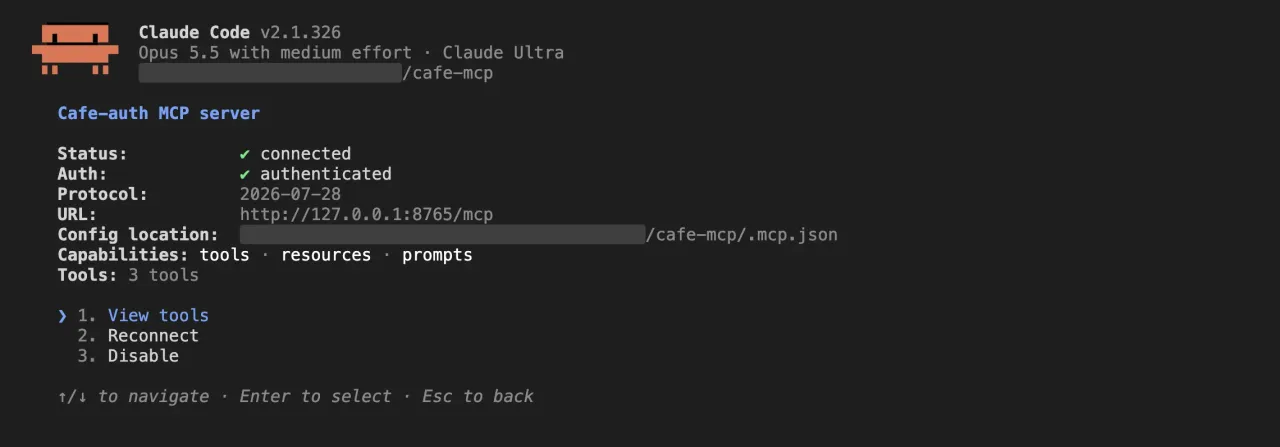
ขึ้น connected กับ authenticated ครบ 3 tools แปลว่า Claude Code ไม่ได้ส่ง Origin ที่ server ปฏิเสธ
Clean Up
claude mcp remove --scope project cafe-auth
หยุด http_server.py (Ctrl+C)
Pitfalls
allowed_origins=[]ปฏิเสธเว็บ client ที่เรียก server ตรง ๆ จากเบราว์เซอร์ด้วย ถ้ามี client แบบนั้นให้ใส่ origin ของมันตรงตัว เช่นhttps://app.example.comไม่ใช้ wildcardallowed_hostsต้องตรงกับ Host ที่ client ส่งรวม port เรียกผ่านlocalhost:8765ก็ได้421- ถ้า SDK รุ่นหน้าเปลี่ยนไปตรวจ Origin ก่อน Host กรณี
foreign-host-and-originจะ Fail ต้องแก้ค่าที่คาดเป็น403 fetch_salesอ่านPOS_API_TOKENตอนเรียก ไม่ตั้งไว้จะได้KeyErrorเก็บใน environment variable ของ server เหมือนCAFE_*ไม่เขียนลง.mcp.jsonที่ committest_pos.pyตรวจแค่ header ที่ส่งออก ไม่ได้ตรวจว่า API ปลายทางรับ credential นั้น
Summary
http_server.py รับแค่ Host 127.0.0.1:8765 ที่ไม่มี Origin โดยไม่พึ่งค่าเริ่มต้นของ SDK แล้ว Origin: http://localhost:3000 เปลี่ยนจาก 200 เป็น 403 แต่ Claude Code ยังต่อได้ pos.py ส่ง credential ของ server เองให้ API ปลายทาง และ เทสต์ชุด 33 ตัว Fail เมื่อเราถอด guard ออก
ถึงตรงนี้เรามีครบทั้งสองฝั่ง ฝั่งติดตั้ง server ของคนอื่นกับฝั่งเปิด server ของเรา
| When | Check | Lesson |
|---|---|---|
| ก่อนติดตั้ง server ของคนอื่น | อ่านคำสั่งเต็มใน .mcp.json และอ่านโค้ดของ server ก่อนรัน | Run Tool Attacks, Defend Against Tool Attacks |
| ก่อนติดตั้ง server ของคนอื่น | พิมพ์ description กับ schema เต็มด้วย review_tools.py review แล้วดู argument ที่เกินหน้าที่ | Defend Against Tool Attacks |
| ก่อนติดตั้ง server ของคนอื่น | pin หลังอนุมัติ commit tools.lock.json แล้วรัน check ก่อนใช้งาน | Defend Against Tool Attacks |
| ก่อนติดตั้ง server ของคนอื่น | รัน server แบบ stdio ใน sandbox ที่ปิด network และกันไฟล์ข้อมูล | Defend Against Tool Attacks |
| ทุกครั้งที่เรียก tool | อ่าน argument ในหน้าขออนุญาตก่อนกด Yes | Run Tool Attacks |
| ก่อนเปิด server ของเรา | ทุก request ต้องมี token ที่ออกให้ server นี้ | Require a Token |
| ก่อนเปิด server ของเรา | tool ที่แก้ข้อมูลตรวจ scope ก่อนทำงาน | Limit Tools by Scope |
| ก่อนเปิด server ของเรา | bind ที่ 127.0.0.1 และระบุ allowed_hosts กับ allowed_origins เอง | บทนี้ |
| ก่อนเปิด server ของเรา | เรียก API อื่นด้วย credential ของ server เอง | บทนี้ |
| ก่อนเปิด server ของเรา | มีเทสต์ที่เคยทำให้ Fail ด้วยการถอด guard | บทนี้, Limit Tools by Scope |
ยังเหลือค่าที่ AI ส่งเข้ามาใน argument ถ้า tool เอาค่านั้นไปต่อเป็นคำสั่ง shell จะเกิดอะไรขึ้น? บทหน้า Shell Commands from Tool Input ลองดูครับ