
Lesson 5
Confirm Actions with Elicitation
ถ้า AI สั่งยกเลิกออร์เดอร์ผิดจะทำยังไง เพิ่ม tool ที่แก้ข้อมูล แล้วให้ server ถามเรายืนยันก่อนยกเลิกทุกครั้ง
list_menu แค่อ่านข้อมูล ถ้า AI เรียกผิดก็ไม่มีอะไรเสียหายครับ ต่อไปเป็น tool ที่แก้ข้อมูล คือ create_order สร้างออร์เดอร์ กับ cancel_order ยกเลิกออร์เดอร์
จบบทนี้เราจะสั่งให้ Claude Code ยกเลิกออร์เดอร์ แล้ว server จะขึ้นฟอร์มถามเราก่อนทุกครั้ง
ทุกคำสั่งรันในโฟลเดอร์ cafe-mcp เดิม ถ้า http_server.py จากบท Intercept Requests and Responses ยังรันค้างอยู่ให้หยุดก่อน เพราะมันยังใช้โค้ดเก่า
What Is Elicitation
AI เรียก tool เองได้ ถ้ามันเลือกเลขออร์เดอร์ผิด ออร์เดอร์ของลูกค้าอีกคนก็จะโดนยกเลิกไปด้วย การยกเลิกเลยควรให้คนกดยืนยันก่อน
การที่ server ถามผู้ใช้ระหว่างที่ tool ทำงานเรียกว่า elicitation ผู้ใช้ตอบได้ 3 แบบ คือ accept (ตอบมาพร้อมข้อมูล), decline (ปฏิเสธ) และ cancel (ปิดหน้าต่างทิ้งโดยไม่ตอบ)
แบบ 2026-07-28 ให้ server ถามผู้ใช้ผ่าน result ที่มี resultType: "input_required" แล้วรอ request ซ้ำจาก client (ดู Server-to-Client Requests)
cancel_order ทำงานตามนี้
Tool Call
client เรียก tools/call ของ cancel_order ด้วย order_id
Input Request
server ยังไม่ยกเลิก แต่ตอบ result ที่มี resultType: "input_required" พร้อมคำถามใน inputRequests และ requestState ที่ client ต้องเก็บไว้
User Prompt
client โชว์คำถามให้ผู้ใช้ แล้วเก็บคำตอบ
Repeated Request
client ส่ง tools/call เดิมซ้ำ แนบ inputResponses (คำตอบ) กับ requestState (ค่าที่ server ให้มา) กลับไป
Final Result
คราวนี้ server มีคำตอบแล้ว tool ทำงานจนจบ และตอบ resultType: "complete"
ฝั่ง server ไม่มีอะไรค้างอยู่ระหว่างสอง request ทุกอย่างที่ต้องจำอยู่ใน requestState
Write the Code
โค้ดทั้งหมดอยู่ใน cafe_server.py เดิม list_menu จากบท Build Your First Tool ไม่ต้องแก้ แค่เพิ่ม
- Imports ชุดใหม่
- Models กับ
load_orderที่อ่านออร์เดอร์จาก Database create_ordercancel_orderกับฟังก์ชันที่สร้างคำถามยืนยัน
1. Imports
แทนที่ import ชุดบนสุดของไฟล์ด้วยชุดนี้
from typing import Annotated, TypedDict

from mcp.server.mcpserver import AcceptedElicitation, Elicit, ElicitationResult, MCPServer, Resolve
from mcp.server.mcpserver.exceptions import ToolError
from pydantic import BaseModel

from database import connect
2. Models and a Loader
เพิ่มต่อจาก list_menu (ก่อนบล็อก if __name__)
class OrderItem(BaseModel):
    menu: str
    size: str
    quantity: int


class Order(TypedDict):
    id: int
    customer: str
    status: str
    total_thb: int
    items: list[OrderItem]


class Confirmation(BaseModel):
    confirm: bool


def load_order(order_id: int) -> Order | None:
    with connect() as db:
        row = db.execute("SELECT id, customer, status, total_thb FROM orders WHERE id = ?", (order_id,)).fetchone()
        if row is None:
            return None
        items = db.execute("SELECT menu, size, quantity FROM order_items WHERE order_id = ?", (order_id,)).fetchall()
    return {**dict(row), "items": [OrderItem(**dict(item)) for item in items]}
OrderItemเป็น input หนึ่งรายการของออร์เดอร์ SDK แปลงเป็นinputSchemaให้เหมือน type hints ในบท Build Your First ToolConfirmationเป็นหน้าตาของคำตอบที่ server ขอจากผู้ใช้ มี field เดียวคือconfirm(elicitation รับ schema แบบ field เรียบ ๆ เท่านั้น เช่น string, ตัวเลข, boolean)- ทุก query ใน
load_orderใช้?placeholder (เขียน?ไว้ใน query แล้วส่งค่าแยกต่างหาก) ค่าที่ส่งแยกจะถูกใช้เป็นข้อมูลเสมอ ไม่ถูกรันเป็นคำสั่งorder_idตรงนี้เป็นintอยู่แล้ว แต่create_orderข้างล่างรับชื่อเมนูที่เป็นข้อความจาก AI ถ้าต่อ string เอง ข้อความนั้นอาจมีคำสั่ง SQL ปนมาแล้วถูกรันไปด้วย
3. create_order
เพิ่มต่อจาก load_order (ก่อนบล็อก if __name__ เหมือนเดิม)
@mcp.tool()
def create_order(items: list[OrderItem], customer_name: str) -> Order:
    """Create an order for a customer. Each item needs a menu name, a size (S, M or L) and a quantity."""
    if not items or not customer_name.strip():
        raise ToolError("An order needs a customer name and at least one item.")
    total = 0
    with connect() as db:
        for item in items:
            menu = db.execute("SELECT price_thb, available FROM menu WHERE name = ?", (item.menu,)).fetchone()
            size = db.execute("SELECT 1 FROM recipes WHERE menu = ? AND size = ?", (item.menu, item.size)).fetchone()
            if menu is None or not menu["available"] or size is None or item.quantity < 1:
                raise ToolError(f"Cannot order {item.quantity} x {item.menu} size {item.size}: check list_menu first.")
            total += menu["price_thb"] * item.quantity
        cursor = db.execute(
            "INSERT INTO orders (customer, status, total_thb, order_date) VALUES (?, 'open', ?, date('now'))",
            (customer_name, total),
        )
        db.executemany(
            "INSERT INTO order_items VALUES (?, ?, ?, ?)",
            [(cursor.lastrowid, item.menu, item.size, item.quantity) for item in items],
        )
    return load_order(cursor.lastrowid)
ลำดับในฟังก์ชันคือ ตรวจทุกรายการก่อน แล้วค่อยเขียน ถ้ารายการไหนไม่ผ่านจะ raise ToolError ก่อนถึงบรรทัด INSERT ออร์เดอร์เลยไม่ถูกสร้างครึ่งเดียว
ราคารวมคำนวณจากราคาใน Database เอง AI ไม่ได้ส่งราคามา เลยกำหนดราคาเองไม่ได้
ToolError ทำให้ client ได้ result ที่ isError: true พร้อมข้อความที่ AI อ่านแล้วแก้ input ได้
4. cancel_order
เพิ่มต่อจาก create_order
def ask_cancel_confirmation(order_id: int) -> Elicit[Confirmation]:
    order = load_order(order_id)
    if order is None:
        raise ToolError(f"Order {order_id} not found.")
    return Elicit(f"Cancel order {order_id} for {order['customer']} ({order['total_thb']} THB)?", Confirmation)


@mcp.tool()
def cancel_order(
    order_id: int,
    answer: Annotated[ElicitationResult[Confirmation], Resolve(ask_cancel_confirmation)],
) -> str:
    """Cancel an order after the user confirms."""
    if not isinstance(answer, AcceptedElicitation) or not answer.data.confirm:
        return f"Order {order_id} was not cancelled."
    with connect() as db:
        db.execute("UPDATE orders SET status = 'cancelled' WHERE id = ?", (order_id,))
    return f"Order {order_id} cancelled."
cancel_order ต่างจาก tool ปกติ 3 จุด
ask_cancel_confirmationคือฟังก์ชันที่ประกาศว่า "ต้องถามอะไร" มันอ่านออร์เดอร์จาก Database ใส่ชื่อลูกค้ากับยอดในคำถาม แล้วคืนElicitที่มีข้อความถามกับหน้าตาของคำตอบ (Confirmation) ผู้ใช้เลยเห็นว่ากำลังจะยกเลิกอะไร ถ้าไม่มีออร์เดอร์ก็ error ตั้งแต่ตรงนี้ ไม่ต้องถามอะไรanswer: Annotated[ElicitationResult[Confirmation], Resolve(...)]บอก SDK ว่าanswerคือคำตอบของผู้ใช้ SDK เลยไม่ใส่ไว้ในinputSchema(AI เห็นแค่order_id)- body ของ tool รันเมื่อมีคำตอบแล้วเท่านั้น ถ้ายังไม่มี SDK จะตอบ
input_requiredเองโดยไม่เข้า body เลย
ใน body ยกเลิกเฉพาะตอนที่ผู้ใช้ accept (คำตอบเป็น AcceptedElicitation) และติ๊ก confirm เป็นจริง ผู้ใช้ decline, cancel หรือตอบ confirm: false ได้ข้อความ was not cancelled ทั้งหมด
ctx.elicit() ที่เห็นในตัวอย่างเก่า ๆ ใช้ไม่ได้ในโหมด 2026-07-28 บน SDK 2.3.0 มันพยายามส่งคำถามกลับไปหา client กลางทางแล้วขึ้น error ว่าไม่มีช่องทางกลับ (no back-channel) ใช้ Resolve แทนTest with curl
ทดสอบ 2 ชั้น ชั้นแรกเรียกใน process เดียวกันด้วย Client ชั้นที่สองส่ง HTTP ด้วย curl ให้เห็นข้อความดิบของ input_required
In-Process Client
สร้างไฟล์ try_orders.py
import asyncio

from mcp import Client
from mcp_types import ElicitResult

from cafe_server import mcp


def answer(action: str):
    async def callback(context, params):
        print(f"server asks: {params.message} -> user says {action}")
        return ElicitResult(action=action, content={"confirm": True} if action == "accept" else None)

    return callback


async def main() -> None:
    async with Client(mcp) as client:
        tools = await client.list_tools()
        print("tools:", [tool.name for tool in tools.tools])

        order = {"items": [{"menu": "iced latte", "size": "M", "quantity": 2}], "customer_name": "Somchai"}
        result = await client.call_tool("create_order", order)
        print("created:", result.structured_content)

        for menu in ("mocha", "thai tea"):
            bad = {"items": [{"menu": menu, "size": "M", "quantity": 1}], "customer_name": "Somchai"}
            result = await client.call_tool("create_order", bad)
            print(f"{menu}: is_error={result.is_error}", result.content[0].text)

    for action in ("accept", "decline"):
        async with Client(mcp, elicitation_callback=answer(action)) as client:
            result = await client.call_tool("cancel_order", {"order_id": 1})
            print(f"{action}:", result.content[0].text)


asyncio.run(main())
mcp_types ติดตั้งมากับ mcp อยู่แล้ว ส่วน elicitation_callback คือฟังก์ชันที่ทำหน้าที่แทนผู้ใช้
ตอน server ถาม SDK ฝั่ง client จะเรียกฟังก์ชันนี้ ในแอปอย่าง Claude Code ตรงนี้คือหน้าต่างถามผู้ใช้
ลบ cafe.db ก่อนเพื่อให้ได้ข้อมูลตั้งต้นชุดเดียวกับในบทนี้ แล้วรัน (2>/dev/null ซ่อน log ของ SDK ที่พิมพ์ทุกครั้งที่ tool ตอบ error)
rm -f cafe.db
uv run python try_orders.py 2>/dev/null
tools: ['list_menu', 'create_order', 'cancel_order']
created: {'id': 3, 'customer': 'Somchai', 'status': 'open', 'total_thb': 130, 'items': [{'menu': 'iced latte', 'size': 'M', 'quantity': 2}]}
mocha: is_error=True Error executing tool create_order: Cannot order 1 x mocha size M: check list_menu first.
thai tea: is_error=True Error executing tool create_order: Cannot order 1 x thai tea size M: check list_menu first.
server asks: Cancel order 1 for Malee (125 THB)? -> user says accept
accept: Order 1 cancelled.
server asks: Cancel order 1 for Malee (125 THB)? -> user says decline
decline: Order 1 was not cancelled.
ออร์เดอร์ใหม่ได้ id 3 เพราะข้อมูลตั้งต้นมี 2 ออร์เดอร์อยู่แล้ว ส่วนยอด 130 บาทมาจากไอซ์ลาเต้ 65 × 2
curl over HTTP
รอบ accept เมื่อกี้ยกเลิกออร์เดอร์ 1 ใน cafe.db ไปแล้ว เลยลบ Database อีกรอบ
แล้วเปิด server แบบ HTTP ในอีก terminal (cd เข้า cafe-mcp ก่อน) เหมือนบท Intercept Requests and Responses
rm -f cafe.db
uv run python http_server.py
กลับมาที่หน้าต่างเดิม ใช้ตัวแปร URL กับ META ชุดเดิมจากบท Intercept Requests and Responses
แต่ META ต้องเพิ่ม "elicitation":{} ใน clientCapabilities เพราะ client ต้องประกาศก่อนว่าถามผู้ใช้ได้ server ถึงจะส่งคำถามมา
URL=http://127.0.0.1:8765/mcp
META='"_meta":{"io.modelcontextprotocol/protocolVersion":"2026-07-28","io.modelcontextprotocol/clientCapabilities":{"elicitation":{}}}'
Create an Order
curl -s $URL \
  -H 'Content-Type: application/json' \
  -H 'Accept: application/json, text/event-stream' \
  -H 'MCP-Protocol-Version: 2026-07-28' \
  -H 'Mcp-Method: tools/call' \
  -H 'Mcp-Name: create_order' \
  -d "{\"jsonrpc\":\"2.0\",\"id\":1,\"method\":\"tools/call\",\"params\":{\"name\":\"create_order\",\"arguments\":{\"customer_name\":\"Somchai\",\"items\":[{\"menu\":\"latte\",\"size\":\"M\",\"quantity\":2}]},$META}}" \
  | python3 -m json.tool
{
    "jsonrpc": "2.0",
    "id": 1,
    "result": {
        "content": [
            {
                "text": "{\n  \"id\": 3,\n  \"customer\": \"Somchai\",\n  \"status\": \"open\",\n  \"total_thb\": 120,\n  \"items\": [\n    {\n      \"menu\": \"latte\",\n      \"size\": \"M\",\n      \"quantity\": 2\n    }\n  ]\n}",
                "type": "text"
            }
        ],
        "isError": false,
        "resultType": "complete",
        "structuredContent": {
            "id": 3,
            "customer": "Somchai",
            "status": "open",
            "total_thb": 120,
            "items": [
                {
                    "menu": "latte",
                    "size": "M",
                    "quantity": 2
                }
            ]
        },
        "_meta": {
            "io.modelcontextprotocol/serverInfo": {
                "name": "cafe",
                "version": ""
            }
        }
    }
}
ถ้าสั่งชาไทย (เมนูที่ available = 0) ด้วย request เดียวกัน เปลี่ยนเป็น "menu":"thai tea" กับ "quantity":1 จะได้ result ที่ isError เป็น true กับข้อความเดียวกับที่ try_orders.py พิมพ์
HTTP status เป็น 200 เพราะ request ถูกรูปแบบ ส่วนที่บอกว่า tool Fail คือ isError AI อ่านข้อความแล้วเลือกเมนูใหม่หรือแจ้งผู้ใช้ได้
First Request: input_required
เรียก cancel_order ของออร์เดอร์ที่เพิ่งสร้าง (เก็บ response ไว้ในตัวแปร FIRST เพราะต้องหยิบ requestState ไปใช้ต่อ)
FIRST=$(curl -s $URL \
  -H 'Content-Type: application/json' \
  -H 'Accept: application/json, text/event-stream' \
  -H 'MCP-Protocol-Version: 2026-07-28' \
  -H 'Mcp-Method: tools/call' \
  -H 'Mcp-Name: cancel_order' \
  -d "{\"jsonrpc\":\"2.0\",\"id\":3,\"method\":\"tools/call\",\"params\":{\"name\":\"cancel_order\",\"arguments\":{\"order_id\":3},$META}}")
echo "$FIRST" | python3 -m json.tool
{
    "jsonrpc": "2.0",
    "id": 3,
    "result": {
        "inputRequests": {
            "cafe_server:ask_cancel_confirmation": {
                "method": "elicitation/create",
                "params": {
                    "message": "Cancel order 3 for Somchai (120 THB)?",
                    "mode": "form",
                    "requestedSchema": {
                        "properties": {
                            "confirm": {
                                "title": "Confirm",
                                "type": "boolean"
                            }
                        },
                        "required": [
                            "confirm"
                        ],
                        "type": "object"
                    }
                }
            }
        },
        "requestState": "v1.A9O3LGVkpiZ-5Au0JBH-LnoTvyfGEuJnCzBxfOfbuI...",
        "resultType": "input_required",
        "_meta": {
            "io.modelcontextprotocol/serverInfo": {
                "name": "cafe",
                "version": ""
            }
        }
    }
}
(requestState ตัดให้สั้น ค่าจริงยาวกว่านี้มาก)
ยังไม่มีอะไรถูกยกเลิก server ส่งคำถามยืนยันกลับมาแทน
ใน inputRequests แต่ละคำถามมี key ของตัวเอง (cafe_server:ask_cancel_confirmation) ตอนตอบกลับต้องใช้ key นี้ ส่วน requestedSchema บอกว่าคำตอบต้องมี field อะไร
Second Request: The Answer
ดึง requestState ออกมา แล้วส่ง request เดิมซ้ำ เพิ่ม inputResponses กับ requestState
ลองตอบปฏิเสธก่อน
STATE=$(echo "$FIRST" | python3 -c 'import json,sys; print(json.load(sys.stdin)["result"]["requestState"])')
KEY=cafe_server:ask_cancel_confirmation

curl -s $URL \
  -H 'Content-Type: application/json' \
  -H 'Accept: application/json, text/event-stream' \
  -H 'MCP-Protocol-Version: 2026-07-28' \
  -H 'Mcp-Method: tools/call' \
  -H 'Mcp-Name: cancel_order' \
  -d "{\"jsonrpc\":\"2.0\",\"id\":4,\"method\":\"tools/call\",\"params\":{\"name\":\"cancel_order\",\"arguments\":{\"order_id\":3},\"inputResponses\":{\"$KEY\":{\"action\":\"decline\"}},\"requestState\":\"$STATE\",$META}}" \
  | python3 -m json.tool
ได้ resultType: "complete" กับข้อความ Order 3 was not cancelled. ทีนี้ใช้ $STATE ก้อนเดิม (requestState ใช้ซ้ำได้จนกว่าจะหมดอายุ) เปลี่ยนคำตอบเป็น accept พร้อม "content":{"confirm":true}
curl -s $URL \
  -H 'Content-Type: application/json' \
  -H 'Accept: application/json, text/event-stream' \
  -H 'MCP-Protocol-Version: 2026-07-28' \
  -H 'Mcp-Method: tools/call' \
  -H 'Mcp-Name: cancel_order' \
  -d "{\"jsonrpc\":\"2.0\",\"id\":5,\"method\":\"tools/call\",\"params\":{\"name\":\"cancel_order\",\"arguments\":{\"order_id\":3},\"inputResponses\":{\"$KEY\":{\"action\":\"accept\",\"content\":{\"confirm\":true}}},\"requestState\":\"$STATE\",$META}}" \
  | python3 -m json.tool
{
    "jsonrpc": "2.0",
    "id": 5,
    "result": {
        "content": [
            {
                "text": "Order 3 cancelled.",
                "type": "text"
            }
        ],
        "isError": false,
        "resultType": "complete",
        "structuredContent": {
            "result": "Order 3 cancelled."
        },
        "_meta": {
            "io.modelcontextprotocol/serverInfo": {
                "name": "cafe",
                "version": ""
            }
        }
    }
}
Client Without Elicitation
ลองเรียกด้วย _meta ที่ clientCapabilities เป็น {} (ไม่ประกาศว่าตอบคำถามผู้ใช้ได้)
NOCAP='"_meta":{"io.modelcontextprotocol/protocolVersion":"2026-07-28","io.modelcontextprotocol/clientCapabilities":{}}'

curl -s -w '\nHTTP %{http_code}\n' $URL \
  -H 'Content-Type: application/json' \
  -H 'Accept: application/json, text/event-stream' \
  -H 'MCP-Protocol-Version: 2026-07-28' \
  -H 'Mcp-Method: tools/call' \
  -H 'Mcp-Name: cancel_order' \
  -d "{\"jsonrpc\":\"2.0\",\"id\":6,\"method\":\"tools/call\",\"params\":{\"name\":\"cancel_order\",\"arguments\":{\"order_id\":1},$NOCAP}}"
{"jsonrpc":"2.0","id":6,"error":{"code":-32021,"message":"Client did not declare the form elicitation capability required by resolver 'cafe_server:ask_cancel_confirmation'","data":{"requiredCapabilities":{"elicitation":{"form":{}}}}}}
HTTP 400
server ไม่ส่งคำถามไปให้ client ที่ตอบไม่ได้ ตอบ error -32021 บอกว่าขาด capability อะไร และ tool ไม่ทำงาน
Try It in Claude Code
ใช้ server cafe แบบ stdio ที่ตั้งไว้ในบท Build Your First Tool ได้เลย แต่ Claude Code เปิด server ไว้ตั้งแต่ตอนเริ่ม ต้องให้มันโหลดโค้ดใหม่ก่อน
Reload the Server
ปิด http_server.py (Ctrl+C) แล้วลบ cafe.db อีกรอบด้วย rm -f cafe.db เลขออร์เดอร์จะเริ่มที่ 3 เหมือนในภาพ
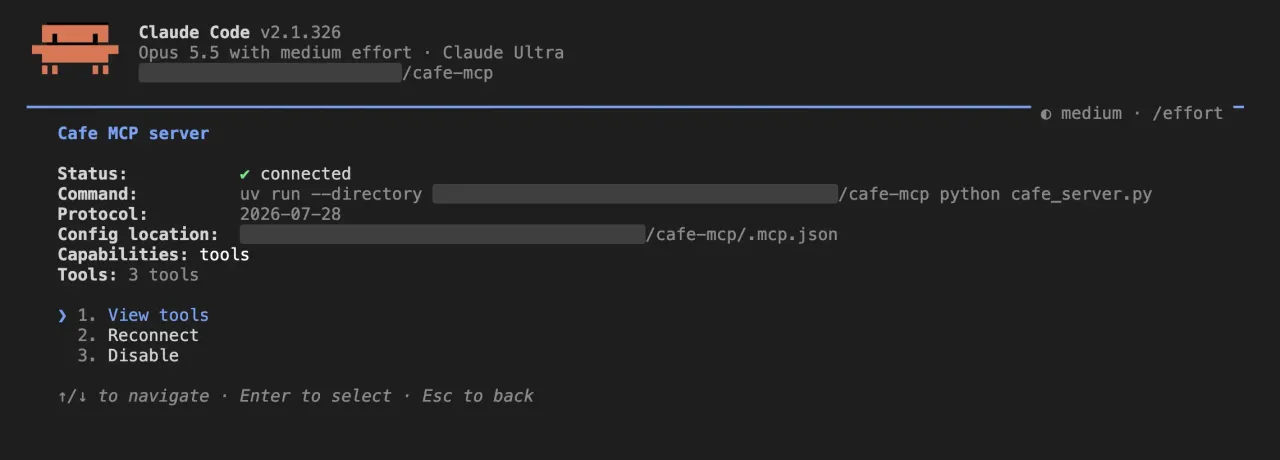
จากนั้นออกจาก Claude Code (/exit) แล้วเปิด claude ใหม่ในโฟลเดอร์ cafe-mcp พิมพ์ /mcp ดู cafe ต้องขึ้น connected และมี 3 tools
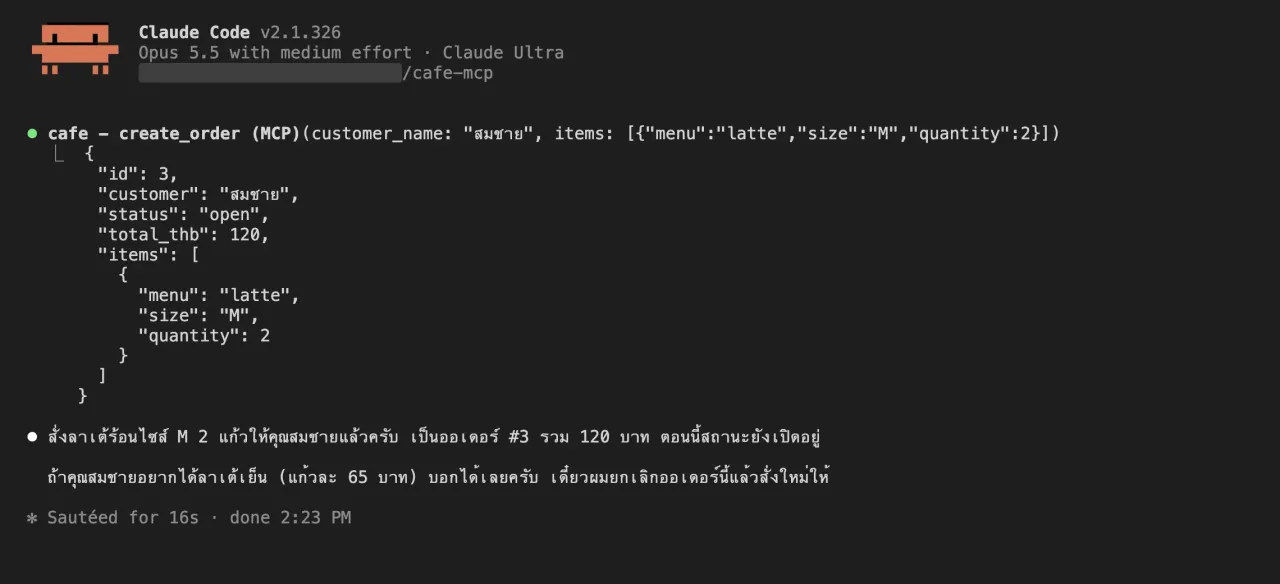
Ask for an Order
สั่งลาเต้ไซส์ M 2 แก้วให้คุณสมชาย
Claude Code เรียก list_menu ก่อน แล้วเรียก create_order ด้วยชื่อลูกค้า สมชาย ได้ออร์เดอร์ยอด 120 บาท (ในโหมดปกติ Claude Code จะถามสิทธิ์ก่อนเรียกแต่ละ tool กดอนุญาต)
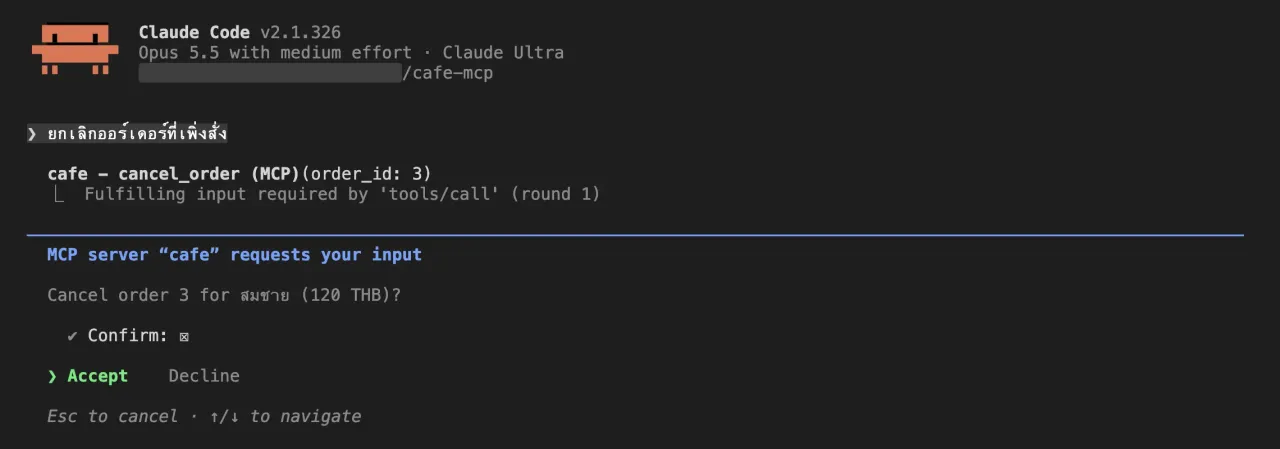
Ask It to Cancel
ยกเลิกออร์เดอร์ที่เพิ่งสั่ง
Claude Code เรียก cancel_order ด้วย order_id: 3 แล้วขึ้นฟอร์มจาก server ที่บอกชื่อลูกค้ากับยอดเงิน (Cancel order 3 for สมชาย (120 THB)?) กด Space เพื่อติ๊ก Confirm เลือก Accept แล้วกด Enter
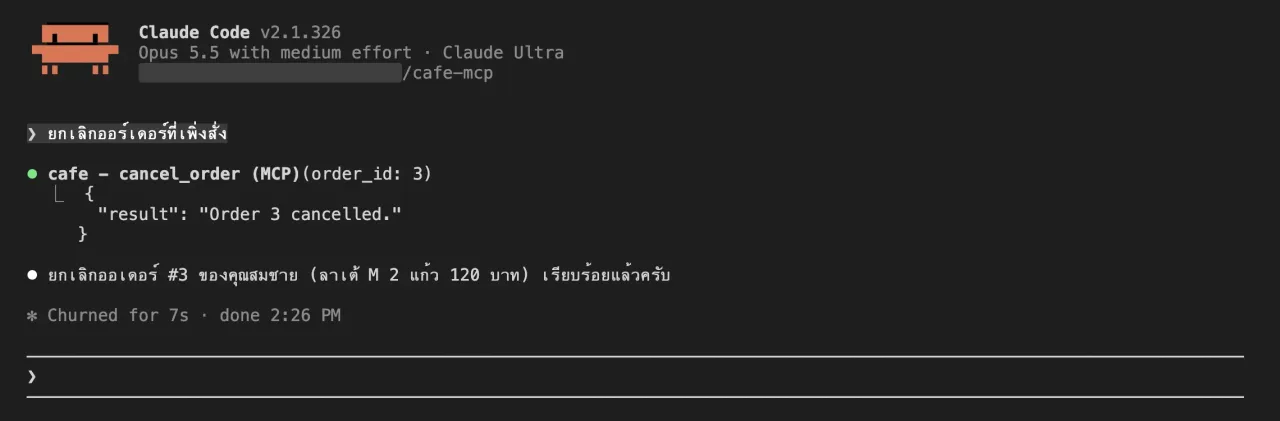
Result
หลังกด Accept cancel_order ได้ Order 3 cancelled. และ Claude แจ้งผู้ใช้ว่ายกเลิกแล้ว
Pitfalls
- MCP Inspector CLI 2.16.0 เรียก
cancel_orderไม่ได้ ข้อความ error ตรงกับ-32021(CLI พิมพ์ code เป็น"error") เพราะ CLI ไม่ประกาศ capability นี้และไม่มี option ให้เปิด ใช้ curl หรือ client ที่ตอบคำถามได้ requestStateต้องส่งกลับทั้งก้อนโดยไม่แก้ ถ้าส่งแต่inputResponsesจะได้input_requiredก้อนใหม่ ไม่มีอะไรถูกยกเลิกcancel_orderในบทนี้ยกเลิกได้ทุกออร์เดอร์ รวมออร์เดอร์ที่completedแล้ว (ออร์เดอร์ 1 ในข้อมูลตั้งต้นเป็นcompletedแต่ตอนทดสอบด้วยtry_orders.pyก็ถูกยกเลิกได้) ถ้าเอาไปใช้ให้เช็กstatusในask_cancel_confirmationก่อนถาม
Summary
create_order ตรวจเมนู สถานะ ขนาด และจำนวนก่อนเขียน และคำนวณยอดจาก Database เอง ส่วน cancel_order ใช้ Resolve ให้ server ถามผู้ใช้ก่อนยกเลิก
ตอนนี้ AI จะรู้ข้อมูลอะไรก็ต้องเรียก tool อย่างเดียว บทหน้า Expose Data with Resources เปิดเมนู ออร์เดอร์ และสูตรเครื่องดื่มให้เราแนบเข้าไปในแชทได้เลย ไม่ต้องรอ AI เรียก tool ครับ