
Lesson 6
Expose Data with Resources
ข้อมูลที่อยากให้ AI อ่านได้เลยโดยไม่ต้องเรียก tool ทำยังไง เปิดเมนู ออร์เดอร์ ยอดขาย และสูตรเครื่องดื่มเป็น resource แล้วอ้างใน Claude Code ด้วย @
tool เป็นสิ่งที่ AI เลือกเรียกเอง แต่ข้อมูลบางอย่างเราอยากส่งให้ AI อ่านตรง ๆ เช่นเมนูทั้งร้าน หรือออร์เดอร์ที่ลูกค้าถามถึงครับ
บทนี้เราจะเปิดข้อมูล 4 ชุดเป็น resource คือเมนู ออร์เดอร์ ยอดขายรายวัน และสูตรเครื่องดื่ม ทุกตัวอ่านอย่างเดียว
จบบทนี้เราจะพิมพ์ @cafe:cafe://menu ใน Claude Code แล้วมันได้เมนูไปอ่านโดยไม่ต้องเรียก tool
ทุกคำสั่งรันในโฟลเดอร์ cafe-mcp ที่ทำค้างไว้จากบทที่แล้ว
What Are Resources
Resource คือข้อมูลที่ server เปิดให้อ่านผ่าน URI (ที่อยู่ของข้อมูล หน้าตาคล้าย URL) เช่น cafe://menu ต่างจาก tool ตรงที่ AI ไม่ได้เป็นคนเลือกเรียก
แอปที่ต่อกับ server (host) เป็นคนตัดสินใจว่าจะดึง resource ไหนไปให้ AI อ่าน อาจให้ผู้ใช้เลือกเอง หรือให้แอปเลือกให้ก็ได้ ตามที่สรุปไว้ในตารางบท Meet MCP and Set Up
| Resource | URI | Type | Returns |
|---|---|---|---|
| เมนู | cafe://menu | static | เมนูทั้งหมดพร้อมราคา |
| ออร์เดอร์ | cafe://orders/{order_id} | template | ออร์เดอร์หนึ่งรายการพร้อมรายการเครื่องดื่ม |
| ยอดขายรายวัน | cafe://sales/{day} | template | เลข สถานะ และยอดของทุกออร์เดอร์ในวันนั้น (ไม่มีชื่อลูกค้า) |
| สูตร | cafe://recipes/{menu}/{size} | template | วิธีทำเครื่องดื่มขนาดนั้น |
resource มี 2 แบบ
- Static มี URI ตายตัว client เห็นจาก
resources/list - Template มีช่องว่างใน URI (
{order_id}) client เห็นรูปแบบ URI จากresources/templates/listแล้วแทนค่าเองก่อนอ่าน
ทั้งสองแบบอ่านด้วย resources/read ที่ส่ง uri ไป ส่วนค่าที่แทนในช่องว่างมาจากข้างนอก (จากผู้ใช้หรือจาก AI) server เลยต้องตรวจเองเหมือนที่ทำกับ input ของ tool
Write the Code
เพิ่มต่อจาก cancel_order ก่อนบล็อก if __name__ tool ทั้ง 3 ตัวเดิมไม่ต้องแก้
- Imports 2 บรรทัด
- Resource เมนูและออร์เดอร์
- Resource ยอดขายและสูตร
1. Imports
เพิ่ม json กับ date ที่บนสุดของไฟล์ และเติม ResourceNotFoundError ในบรรทัด import เดิม
import json
from datetime import date
from typing import Annotated, TypedDict

from mcp.server.mcpserver import AcceptedElicitation, Elicit, ElicitationResult, MCPServer, Resolve
from mcp.server.mcpserver.exceptions import ResourceNotFoundError, ToolError
2. Menu and Order
@mcp.resource("cafe://menu", mime_type="application/json")
def menu_resource() -> list[MenuItem]:
    """The full menu as JSON."""
    return list_menu()


@mcp.resource("cafe://orders/{order_id}", mime_type="application/json")
def order_resource(order_id: str) -> str:
    """One order with its items."""
    try:
        order = load_order(int(order_id))
    except (ValueError, OverflowError):
        raise ResourceNotFoundError(f"'{order_id}' is not an order number") from None
    if order is None:
        raise ResourceNotFoundError(f"Order {order_id} not found")
    return json.dumps(order, default=lambda item: item.model_dump(), ensure_ascii=False)
@mcp.resource(uri, mime_type=...)ลงทะเบียนฟังก์ชันเป็น resourcemime_typeบอก client ว่าเนื้อหาเป็นชนิดไหน เช่น JSON หรือข้อความธรรมดา ถ้า URI มี{ช่องว่าง}SDK ถือว่าเป็น template และส่งค่าในช่องว่างเข้าฟังก์ชันตามชื่อ parametermenu_resourceเรียกlist_menuจากบท Build Your First Tool ไม่ต้องเขียน query ซ้ำorder_idรับเป็นstrแล้วแปลงเป็นintเองในtryค่าที่แปลงไม่ได้ (abcได้ValueError) และเลขที่ใหญ่เกิน SQLite (OverflowError) กลายเป็นResourceNotFoundErrorที่ข้อความบอกว่าผิดตรงไหน- ไม่มีออร์เดอร์ก็
raise ResourceNotFoundErrorซึ่ง SDK ตอบเป็น error-32602ตามที่ spec กำหนดให้ resource ที่ไม่มีอยู่ json.dumpsแปลงOrderเป็นข้อความ JSON ส่วนOrderItemเป็น Pydantic model ซึ่งjson.dumpsแปลงเองไม่เป็น เลยต้องบอกวิธีแปลงผ่านdefault=
3. Sales and Recipe
@mcp.resource("cafe://sales/{day}", mime_type="application/json")
def sales_resource(day: str) -> list[dict]:
    """Orders placed on a day (YYYY-MM-DD), without customer names."""
    try:
        date.fromisoformat(day)
    except ValueError:
        raise ResourceNotFoundError(f"'{day}' is not a date, use YYYY-MM-DD") from None
    with connect() as db:
        rows = db.execute("SELECT id, status, total_thb FROM orders WHERE order_date = ?", (day,))
        return [dict(row) for row in rows]


@mcp.resource("cafe://recipes/{menu}/{size}", mime_type="text/plain")
def recipe_resource(menu: str, size: str) -> str:
    """How to make a drink in a given size."""
    with connect() as db:
        row = db.execute("SELECT instructions FROM recipes WHERE menu = ? AND size = ?", (menu, size)).fetchone()
    if row is None:
        raise ResourceNotFoundError(f"No recipe for {menu} size {size}")
    return row["instructions"]
- ช่องว่างในยอดขายชื่อ
{day}ไม่ใช่{date}เพราะ parameter ชื่อdateจะบังคลาสdateที่ฟังก์ชันนี้เรียกfromisoformat date.fromisoformatตรวจว่าเป็นวันที่ก่อนแตะ Database วันที่ที่ไม่มีจริง เช่น2026-02-30ก็ไม่ผ่าน (รูปแบบ ISO แบบย่ออย่าง20261124ผ่านการตรวจนี้ แต่ไม่ตรงกับorder_dateใน Database เลยได้รายการว่าง)- ค่า
day,menuและsizeที่มาจาก URI ส่งผ่าน?placeholder เหมือนในload_order sales_resourceเลือกเฉพาะid,status,total_thbไม่ส่งชื่อลูกค้า เพราะยอดขายไม่ต้องใช้ชื่อ และชื่อเป็นข้อความที่ลูกค้าพิมพ์เอง จะแอบใส่คำสั่งถึง AI มาก็ได้ รายละเอียดอยู่ในบท Untrusted Text in Resources ของคอร์ส MCP Security
Test with curl
ทดสอบ 3 แบบ
Clientใน process เดียวกัน ดูผลได้เร็วสุด- curl ผ่าน HTTP เห็นข้อความดิบที่วิ่งไปมา
- Inspector CLI ดูว่า client ตัวอื่นอ่านได้เหมือนกัน
In-Process Client
สร้างไฟล์ try_resources.py ที่แสดงรายการ resource แล้วอ่านทีละ URI ทั้งแบบที่ถูกและแบบที่ผิด
import asyncio
from datetime import datetime, timezone

from mcp import Client

from cafe_server import mcp

TODAY = datetime.now(timezone.utc).date().isoformat()
URIS = [
    "cafe://menu",
    "cafe://orders/1",
    "cafe://orders/99",
    "cafe://orders/abc",
    "cafe://orders/99999999999999999999",
    f"cafe://sales/{TODAY}",
    "cafe://sales/2026-02-30",
    "cafe://sales/yesterday",
    "cafe://recipes/latte/M",
    "cafe://recipes/latte/XL",
    "cafe://recipes/' OR 1=1 --/M",
]


async def main() -> None:
    async with Client(mcp) as client:
        print("resources:", [(item.name, item.uri) for item in (await client.list_resources()).resources])
        templates = (await client.list_resource_templates()).resource_templates
        print("templates:", [(item.name, item.uri_template) for item in templates])
        for uri in URIS:
            try:
                result = await client.read_resource(uri)
                print(f"{uri} ->", result.contents[0].mime_type, result.contents[0].text)
            except Exception as error:
                print(f"{uri} -> {type(error).__name__}: {error}")


asyncio.run(main())
TODAY ใช้เวลา UTC เพราะ date('now') ของ SQLite ที่เขียนลง order_date เป็น UTC ถ้าใช้วันที่ตามเวลาไทย ช่วงตี 0 ถึงตี 7 จะไม่เจอออร์เดอร์
ลบ cafe.db เพื่อเริ่มจากข้อมูลตั้งต้น แล้วรัน (2>/dev/null ซ่อน log ของ SDK เหมือนบทที่แล้ว) output ในบทนี้รันวันที่ 2026-11-24 วันที่ในผลของเราจะเป็นวันที่รัน
rm -f cafe.db
uv run python try_resources.py 2>/dev/null
resources: [('menu_resource', 'cafe://menu')]
templates: [('order_resource', 'cafe://orders/{order_id}'), ('sales_resource', 'cafe://sales/{day}'), ('recipe_resource', 'cafe://recipes/{menu}/{size}')]
cafe://menu -> application/json [
  {
    "name": "thai tea",
    "price_thb": 45,
    "available": false
  },
  {
    "name": "americano",
    "price_thb": 50,
    "available": true
  },
  {
    "name": "latte",
    "price_thb": 60,
    "available": true
  },
  {
    "name": "iced latte",
    "price_thb": 65,
    "available": true
  }
]
cafe://orders/1 -> application/json {"id": 1, "customer": "Malee", "status": "completed", "total_thb": 125, "items": [{"menu": "latte", "size": "M", "quantity": 1}, {"menu": "iced latte", "size": "M", "quantity": 1}]}
cafe://orders/99 -> MCPError: Order 99 not found
cafe://orders/abc -> MCPError: 'abc' is not an order number
cafe://orders/99999999999999999999 -> MCPError: '99999999999999999999' is not an order number
cafe://sales/2026-11-24 -> application/json [
  {
    "id": 1,
    "status": "completed",
    "total_thb": 125
  },
  {
    "id": 2,
    "status": "completed",
    "total_thb": 100
  }
]
cafe://sales/2026-02-30 -> MCPError: '2026-02-30' is not a date, use YYYY-MM-DD
cafe://sales/yesterday -> MCPError: 'yesterday' is not a date, use YYYY-MM-DD
cafe://recipes/latte/M -> text/plain Espresso 2 shots, milk 180 ml
cafe://recipes/latte/XL -> MCPError: No recipe for latte size XL
cafe://recipes/' OR 1=1 --/M -> MCPError: No recipe for ' OR 1=1 -- size M
- ชื่อ resource มาจากชื่อฟังก์ชัน (
menu_resource) - string
' OR 1=1 --(ข้อความที่พยายามแทรกเงื่อนไข SQL ให้ query คืนทุกแถว) ถูกใช้เป็นชื่อเมนูธรรมดา ไม่มีสูตรชื่อนี้เลยได้No recipeแทนที่จะได้ข้อมูลทั้งตาราง
curl over HTTP
ลบ Database แล้วเปิด server แบบ HTTP ในอีก terminal (cd เข้า cafe-mcp ก่อน)
rm -f cafe.db
uv run python http_server.py
กลับมาที่หน้าต่างเดิม ใช้ URL กับ META ชุดเดียวกับบทที่แล้ว
เพิ่ม TODAY และเขียน function rpc ครอบ curl เพราะบทนี้ต้องเรียกหลายครั้ง (rpc รับ 3 ค่า คือชื่อ method, ค่าของ header Mcp-Name และ params ของ request สองตัวหลังไม่ใส่ก็ได้)
URL=http://127.0.0.1:8765/mcp
META='"_meta":{"io.modelcontextprotocol/protocolVersion":"2026-07-28","io.modelcontextprotocol/clientCapabilities":{"elicitation":{}}}'
TODAY=$(date -u +%F)

rpc() {
  curl -s $URL \
    -H 'Content-Type: application/json' \
    -H 'Accept: application/json, text/event-stream' \
    -H 'MCP-Protocol-Version: 2026-07-28' \
    -H "Mcp-Method: $1" \
    ${2:+-H} ${2:+"Mcp-Name: $2"} \
    -d "{\"jsonrpc\":\"2.0\",\"id\":1,\"method\":\"$1\",\"params\":{${3:+$3,}$META}}" \
    | python3 -m json.tool
}
resources/read ต้องมี Mcp-Name เท่ากับ uri ใน body เหมือนที่ tools/call ต้องมีชื่อ tool (ไม่ส่งหรือไม่ตรงจะได้ error -32020) ส่วน params เป็นข้อความ JSON เลยครอบด้วย single quote ทั้งก้อน shell จะได้ไม่ตัดเครื่องหมาย " ข้างในทิ้ง
List
rpc resources/list
{
  "jsonrpc": "2.0",
  "id": 1,
  "result": {
    "cacheScope": "private",
    "resources": [
      {
        "description": "The full menu as JSON.",
        "mimeType": "application/json",
        "name": "menu_resource",
        "uri": "cafe://menu"
      }
    ],
    "resultType": "complete",
    "ttlMs": 0,
    "_meta": {
      "io.modelcontextprotocol/serverInfo": {
        "name": "cafe",
        "version": ""
      }
    }
  }
}
template ทั้งสามตัวอยู่ใน rpc resources/templates/list ซึ่งตอบ resourceTemplates ที่มี uriTemplate แทน uri
Read
rpc resources/read cafe://orders/1 '"uri":"cafe://orders/1"'
{
  "jsonrpc": "2.0",
  "id": 1,
  "result": {
    "cacheScope": "private",
    "contents": [
      {
        "mimeType": "application/json",
        "text": "{\"id\": 1, \"customer\": \"Malee\", \"status\": \"completed\", \"total_thb\": 125, \"items\": [{\"menu\": \"latte\", \"size\": \"M\", \"quantity\": 1}, {\"menu\": \"iced latte\", \"size\": \"M\", \"quantity\": 1}]}",
        "uri": "cafe://orders/1"
      }
    ],
    "resultType": "complete",
    "ttlMs": 0,
    "_meta": {
      "io.modelcontextprotocol/serverInfo": {
        "name": "cafe",
        "version": ""
      }
    }
  }
}
ข้อมูลอยู่ใน contents[].text เป็นข้อความ JSON อีกชั้น (ต่างจาก tool ที่มี structuredContent) client ต้องดู mimeType เพื่อรู้ว่าจะ parse ยังไง
ยอดขายของวันนี้
rpc resources/read cafe://sales/$TODAY '"uri":"cafe://sales/'$TODAY'"'
ได้ออร์เดอร์ 1 กับ 2 แบบเดียวกับที่ try_resources.py พิมพ์ ไม่มีชื่อลูกค้า
Bad Input
ออร์เดอร์ที่ไม่มี
rpc resources/read cafe://orders/99 '"uri":"cafe://orders/99"'
{
  "jsonrpc": "2.0",
  "id": 1,
  "error": {
    "code": -32602,
    "message": "Order 99 not found",
    "data": {
      "uri": "cafe://orders/99"
    }
  }
}
วันที่ผิดรูปแบบ สูตรที่ไม่มี และเลขออร์เดอร์ที่ไม่ใช่ตัวเลข ก็ได้ -32602 พร้อมข้อความเดียวกับใน try_resources.py อีกเคสที่ต่างออกไปคือ URI ที่ไม่ตรงกับ resource ไหนเลย
rpc resources/read cafe://nothing/here '"uri":"cafe://nothing/here"'
{
  "jsonrpc": "2.0",
  "id": 1,
  "error": {
    "code": -32602,
    "message": "Unknown resource: cafe://nothing/here",
    "data": {
      "uri": "cafe://nothing/here"
    }
  }
}
อันนี้ SDK ตอบ Unknown resource เอง ส่วน cafe://orders/abc ตรงกับ template ของออร์เดอร์ ฟังก์ชันของเราเลยเป็นคนปฏิเสธ
Inspector CLI
Inspector CLI 2.16.0 อ่าน resource ได้ ใช้ HTTP server ที่เปิดค้างไว้ได้เลย
npx -y @modelcontextprotocol/inspector@2.16.0 --cli http://127.0.0.1:8765/mcp --transport http --method resources/list
{
  "resources": [
    {
      "name": "menu_resource",
      "uri": "cafe://menu",
      "description": "The full menu as JSON.",
      "mimeType": "application/json"
    }
  ]
}
--method resources/templates/list กับ --method resources/read --uri <uri> ก็ใช้ได้
หยุด server ด้วย Ctrl+C ได้เลย ขั้นถัดไป Claude Code ใช้ cafe แบบ stdio ไม่ต้องเปิดตัวนี้ค้างไว้
Try It in Claude Code
ใช้ server cafe แบบ stdio ตัวเดิม ลบ cafe.db ก่อนให้ได้ข้อมูลตั้งต้นชุดเดียวกับในบทนี้
- โหลด server ใหม่
- อ้าง resource ด้วย
@ - ถามเรื่องออร์เดอร์
Reload the Server
ออกจาก Claude Code (/exit) แล้วเปิด claude ใหม่ในโฟลเดอร์ cafe-mcp พิมพ์ /mcp เลือก cafe ต้องขึ้น connected
หน้ารายละเอียดมีบรรทัด Capabilities ที่ระบุ resources ส่วนจำนวน resource หน้านี้ไม่แสดง (แสดงแค่ Tools: 3 tools)
Mention a Resource
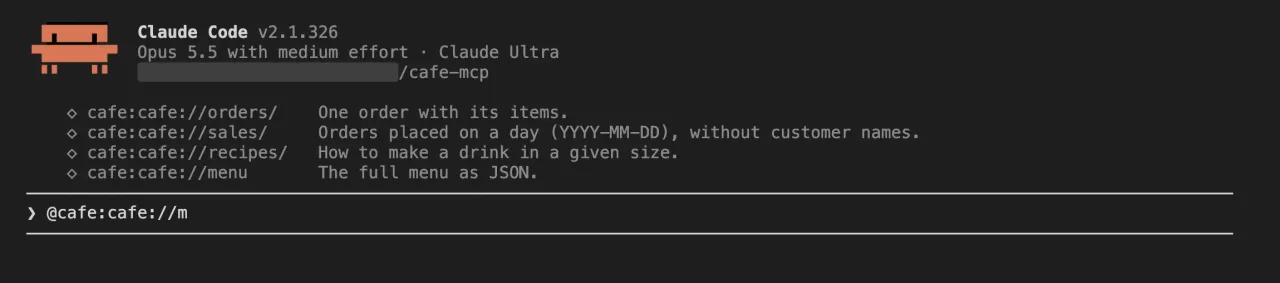
Claude Code เปิดให้อ้างถึง resource ด้วย @ พิมพ์ @ ใน prompt แล้วหา resource ของ cafe จากเมนู autocomplete ซึ่งแสดงปนกับไฟล์ หรือพิมพ์ชื่อเต็มเองในรูป @server:uri
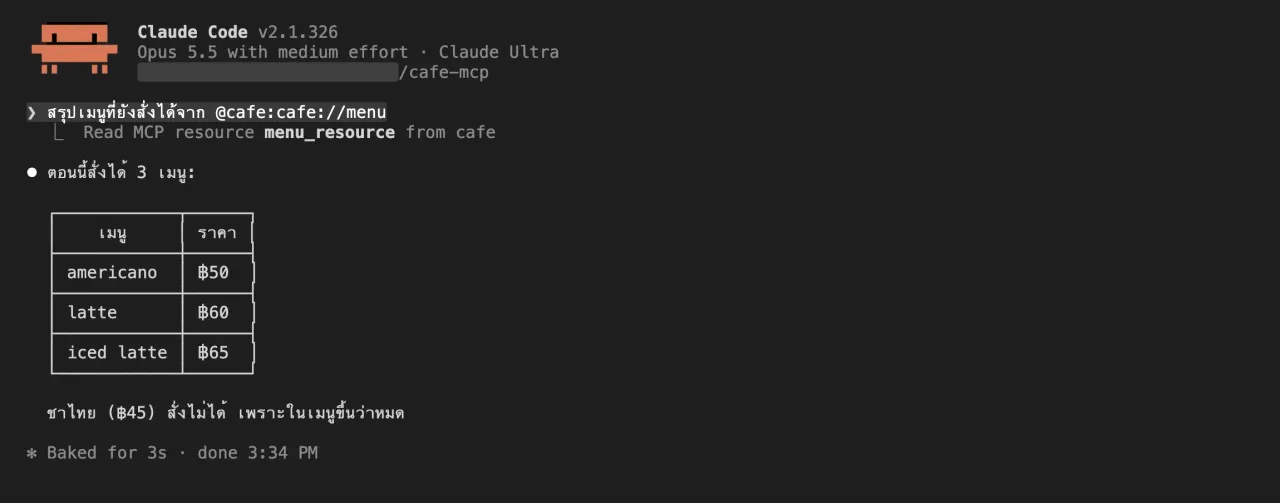
สรุปเมนูที่ยังสั่งได้จาก @cafe:cafe://menu
เมนู autocomplete แสดง resource ของ cafe ทั้งสี่ตัว template แสดงเป็น prefix (cafe:cafe://orders/, cafe:cafe://sales/, cafe:cafe://recipes/) พร้อมคำอธิบาย ส่วน cafe:cafe://menu มีคำอธิบาย "The full menu as JSON."
ภาพข้างล่างคือเมนูหลังพิมพ์ @cafe:cafe://m
resource ที่เลือกจากรายการอย่าง cafe://menu Claude Code ดึงมาแนบให้เอง ขึ้นบรรทัด Read MCP resource menu_resource from cafe แล้ว Claude ตอบจากเมนูที่แนบมาโดยไม่เรียก list_menu
Ask About an Order
ออร์เดอร์ @cafe:cafe://orders/1 มีอะไรบ้าง และเป็นของใคร
ส่วน URI แบบ template ที่พิมพ์เองทั้งเส้น Claude Code จะไม่แนบให้ Claude เลยเรียก tool readMcpResource ของ Claude Code (Read resource "cafe://orders/1" from server "cafe") อ่านเอง
ได้เนื้อหาแล้วตอบว่าเป็นของ Malee สถานะ completed ยอด 125 บาท ประกอบด้วย latte M กับ iced latte M อย่างละแก้ว
Pitfalls
- resource ที่ไม่มีอยู่ต้องตอบ error (
-32602) ไม่ตอบcontentsว่าง เพราะ client แยกไม่ออกว่า "ไม่มี" กับ "มีแต่ว่าง" - parameter ของ template ที่ประกาศเป็น
intให้ SDK แปลง ถ้าแปลงไม่ได้ (เช่นabc) จะได้-32603(Internal Error) กับข้อความกว้าง ๆError creating resource from templateให้รับเป็นstrแล้วแปลงเองในtryเหมือนorder_resource order_dateเก็บเป็นวัน UTC ถ้าร้านอยากได้วันตามเวลาไทย ให้เปลี่ยนตอนเขียนorder_dateเป็นdate('now', '+7 hours')(เช่นdate('2026-11-24 20:00:00', '+7 hours')ได้2026-11-25) และTODAYฝั่ง client ต้องใช้วันตามเวลาไทยด้วย- resource ไม่แก้ข้อมูล แต่ถ้าฟังก์ชันของ resource เขียน Database ก็ไม่มีอะไรห้าม ให้ resource อ่านอย่างเดียวและเอาการเขียนไปไว้ใน tool เพราะผู้ใช้กับ host คาดว่าการอ่านไม่มีผลข้างเคียง
Summary
cafe-mcp มี resource 4 ตัวแล้ว คือ cafe://menu แบบ static กับ template ของออร์เดอร์ ยอดขายรายวัน และสูตร ทุกตัวอ่านอย่างเดียว และ host เป็นคนเลือกว่าจะดึงตัวไหนไปให้ AI
ค่าใน URI ตรวจก่อนใช้ และตอบ -32602 เมื่อไม่พบ resource
ข้อความที่คนพิมพ์ลง Database อย่างชื่อลูกค้าก็ไปถึง AI ทาง resource ได้ด้วย เรื่องนี้อยู่ในบท Untrusted Text in Resources ของคอร์ส MCP Security
ถ้าทุกเย็นเจ้าของร้านอยากให้ AI สรุปยอดขายแบบเดิม ก็ต้องพิมพ์คำสั่งยาว ๆ ซ้ำทุกวัน บทหน้า Build a Prompt ทำคำสั่งนั้นเป็น prompt ที่ดึงยอดขายจาก resource นี้มาให้เองครับ